In this tutorial, we will follow the guideline for developing a plugin to develop our Slack Notification plugin. Please also refer to the very first tutorial How to develop a Bean Shell Hash Variable for more details steps.
ในบทช่วยสอนนี้เราจะทำตามแนวทางในการพัฒนา guideline for developing a plugin การแจ้งเตือนของ Slack โปรดอ้างอิงถึงบทช่วยสอนแรกวิธีการ How to develop a Bean Shell Hash Variable สำหรับขั้นตอนรายละเอียดเพิ่มเติม
1. What is the problem?
อะไรคือปัญหา?
เราต้องการส่งข้อความถึง Slack เพื่อแจ้งเตือนผู้ใช้เมื่อมีการมอบหมายงานที่สร้างขึ้นสำหรับพวกเขาใน Joget Workflow
2. How to solve the problem?
วิธีแก้ปัญหา
เราจะพัฒนาปลั๊กอินAudit Trail Plugin เพื่อส่งข้อความถึง Slack
3. What is the input needed for your plugin?
สิ่งที่จำเป็นในการป้อนข้อมูลสำหรับปลั๊กอินของคุณ?
ในการพัฒนาปลั๊กอินการแจ้งเตือน Slack เราจะพิจารณาตัวเลือกคุณสมบัติที่คล้ายกับ User Notification Plugin
4. What is the output and expected outcome of your plugin?
ผลลัพธ์และผลลัพธ์ที่คาดหวังของปลั๊กอินของคุณคืออะไร?
เมื่อมีการสร้างการมอบหมายสำหรับผู้ใช้ข้อความที่มีลิงก์การกำหนดจะส่งไปยังบัญชี Slack ของตนตามการกำหนดค่า
5. Are there any resources/API that can be reused?
มีทรัพยากร / API ที่สามารถนำกลับมาใช้ใหม่ได้หรือไม่?
เราสามารถใช้ห้องสมุด slack-webhook เพื่อรวมเข้ากับ Slack นอกจากนี้เรายังสามารถขยาย org.joget.apps.app.lib.UserNotificationAuditTrail เพื่อประหยัดเวลาของเราในการใช้วิธีการที่คล้ายกันอีกครั้ง
6. Prepare your development environment
เตรียมสภาพแวดล้อมการพัฒนาของคุณ
The following tutorial is prepared with a Macbook Pro and the Joget Source Code is version 5.0.1. Please refer to the Guideline for developing a plugin article for other platform commands.
Let's say our folder directory is as follows.
เราจำเป็นต้องให้ซอร์สโค้ด Joget Workflow ของเราพร้อมและสร้างโดยปฏิบัติตาม this guideline
บทช่วยสอนต่อไปนี้จัดทำขึ้นด้วย Macbook Pro และรหัสแหล่งที่มาของ Joget เป็นรุ่น 5.0.1 โปรดอ้างอิง Guideline for developing a plugin สำหรับคำสั่งแพลตฟอร์มอื่น ๆ
สมมติว่าไดเรกทอรีโฟลเดอร์ของเรามีดังนี้
- Home
  - joget
    - plugins
    - jw-community
      -5.0.1
The "plugins" directory is the folder we will create and store all our plugins and the "jw-community" directory is where the Joget Workflow Source code is stored.
Run the following command to create a maven project in "plugins" directory.
ไดเรกทอรี "ปลั๊กอิน" คือโฟลเดอร์ที่เราจะสร้างและจัดเก็บปลั๊กอินทั้งหมดของเราและไดเรกทอรี "jw-community" เป็นที่เก็บ Joget Workflow Source code เรียกใช้คำสั่งต่อไปนี้เพื่อสร้างโครงการ maven ในไดเรกทอรี "ปลั๊กอิน"
cd joget/plugins/
~/joget/jw-community/5.0.1/wflow-plugin-archetype/create-plugin.sh org.joget slack_notification 5.0.1
Then, the shell script will ask us to key in a version number for the plugin and ask us for a confirmation before it generates the maven project.
จากนั้นเชลล์สคริปต์จะขอให้เราใส่หมายเลขเวอร์ชันสำหรับปลั๊กอินและขอให้เรายืนยันก่อนที่จะสร้างโครงการ Maven
Define value for property 'version':  1.0-SNAPSHOT: : 5.0.0
[INFO] Using property: package = org.joget
Confirm properties configuration:
groupId: org.joget
artifactId: slack_notification
version: 5.0.0
package: org.joget
Y: : y
We should get a "BUILD SUCCESS" message shown in our terminal and a "slack_notification" folder created in the "plugins" folder.
Open the maven project with your favourite IDE. I will be using NetBeans.
เราควรได้รับข้อความ "BUILD SUCCESS" ที่ปรากฏในเครื่องของเราและโฟลเดอร์ "slack_notification" ที่สร้างขึ้นในโฟลเดอร์ "ปลั๊กอิน" เปิดโครงการ maven ด้วย IDE ที่คุณชื่นชอบ ฉันจะใช้ NetBeans
7. Just code it!
เพียงแค่รหัส!
a. Extending the abstract class of a plugin type
การขยายคลาสนามธรรมของประเภทปลั๊กอิน
สร้างคลาส "SlackNotification" ภายใต้แพ็คเกจ "org.joget" จากนั้นขยายคลาสด้วย org.joget.apps.app.lib.UserNotificationAuditTrail คลาสซึ่งขยาย org.joget.plugin.base.DefaultAuditTrailPlugin คลาสนามธรรม โปรดอ้างอิงปลั๊กอิน Audit Trail Plugin เราจะต้องใช้งานคลาสส่วนติดต่อ org.joget.plugin.base.PluginWebSupport เพื่อให้ปุ่มส่งข้อความทดสอบในหน้าคุณสมบัติปลั๊กอิน โปรดอ้างอิง Web Service Plugin
b. Implement all the abstract methods
ใช้วิธีนามธรรมทั้งหมด
ตามปกติเราต้องใช้วิธีนามธรรมทั้งหมด เราจะใช้วิธี AppPluginUtil.getMessage เพื่อสนับสนุน i18n และใช้ตัวแปร MESSAGE_PATH คงที่สำหรับไดเรกทอรีทรัพยากรข้อความมัด
Now, we have to create a UI for admin user to provide inputs for our plugin. In getPropertyOptions method, we already specify our Plugin Properties Options definition file is located at "/properties/slackNotification.json". Let us create a directory "resources/properties" under "slack_notification/src/main" directory. After creating the directory, create a file named "slackNotification.json" in the "properties" folder.
ตอนนี้เราต้องสร้าง UI สำหรับผู้ใช้ผู้ดูแลระบบเพื่อให้อินพุตสำหรับปลั๊กอินของเรา ในวิธีการ getPropertyOptions เราได้ระบุไฟล์ข้อกำหนด Plugin Properties Options แล้วที่ "/properties/slackNotification.json" ให้เราสร้างไดเรกทอรี "ทรัพยากร / คุณสมบัติ" ภายใต้ไดเรกทอรี "slack_notification / src / main" หลังจากสร้างไดเรกทอรีให้สร้างไฟล์ชื่อ "slackNotification.json" ในโฟลเดอร์ "properties"
ในไฟล์ตัวเลือกคำจำกัดความของคุณสมบัติเราจะต้องระบุตัวเลือกดังต่อไปนี้ โปรดทราบว่าเราสามารถใช้ไวยากรณ์ "@@ message.key @@" เพื่อรองรับ i18n ในตัวเลือกคุณสมบัติของเรา ที่นี่เราสามารถคัดลอกตัวเลือกคุณสมบัติของปลั๊กอินการแจ้งเตือนผู้ใช้และแก้ไขจากที่นั่น โปรดอ้างอิงถึง userNotificationAuditTrail.json
[{
    title : '@@SlackNotification.config@@',
    properties : [
    {
        name : 'apiurl',
        label : '@@SlackNotification.url@@',
        type : 'textfield',
        required : 'true'
    },
    {
        label : '@@SlackNotification.from@@',
        type : 'header'
    },
    {
        name : 'username',
        label : '@@SlackNotification.fromUsername@@',
        type : 'textfield',
        value : '@@SlackNotification.fromUsername.value@@'
    },
    {
        name : 'customIcon',
        label : '@@SlackNotification.customIcon@@',
        type : 'selectbox',
        value : 'joget',
        options : [{
            value : '',
            label : '@@SlackNotification.customIcon.none@@'
        },
        {
            value : 'joget',
            label : '@@SlackNotification.customIcon.joget@@'
        },
        {
            value : 'url',
            label : '@@SlackNotification.customIcon.url@@'
        },
        {
            value : 'emoji',
            label : '@@SlackNotification.customIcon.emoji@@'
        }]
    },
    {
        name : 'iconUrl',
        label : '@@SlackNotification.customIcon.url@@',
        type : 'textfield',
        required : 'true',
        control_field: 'customIcon',
        control_value: 'url',
        control_use_regex: 'false'
    },
    {
        name : 'iconEmoji',
        label : '@@SlackNotification.customIcon.emoji@@',
        type : 'textfield',
        required : 'true',
        control_field: 'customIcon',
        control_value: 'emoji',
        control_use_regex: 'false'
    },
    {
        label : '@@SlackNotification.to@@',
        type : 'header'
    },
    {
        name : 'usernameTransform',
        label : '@@SlackNotification.usernameTransform@@',
        description : '@@SlackNotification.usernameTransform.desc@@',
        type : 'textfield',
        value : '@@SlackNotification.usernameTransform.value@@',
        required : 'True'
    },
    {
        label : '@@SlackNotification.message@@',
        type : 'header'
    },
    {
        name : 'text',
        label : '@@SlackNotification.text@@',
        description : '@@SlackNotification.text.desc@@',
        type : 'codeeditor',
        required : 'True'
    },
    {
        name : 'unfurl_links',
        label : '@@SlackNotification.unfurl_links@@',
        description : '@@SlackNotification.unfurl_links.desc@@',
        type : 'checkbox',
        value : 'true',
        options : [{
            value : 'true',
            label : ''
        }]
    },
    {
        name : 'unfurl_media',
        label : '@@SlackNotification.unfurl_media@@',
        description : '@@SlackNotification.unfurl_media.desc@@',
        type : 'checkbox',
        value : 'true',
        options : [{
            value : 'true',
            label : ''
        }]
    }],
    buttons : [{
        name : 'sendTestMessage',
        label : '@@SlackNotification.sendTestMessage@@',
        ajax_url : '[CONTEXT_PATH]/web/json/app[APP_PATH]/plugin/org.joget.SlackNotification/service?action=sendTestMessage',
        fields : ['url'],
        addition_fields : [
            {
                name : 'testChannel',
                label : '@@SlackNotification.sendTestMessage.testChannel@@',
                type : 'textfield'
            }
        ]
    }]
},
{
    title : '@@app.usernotificationaudittrail.notificationLink@@',
    properties : [
    {
        name : 'base',
        label : '@@app.usernotificationaudittrail.baseUrl@@',
        type : 'textfield',
        description : '@@app.usernotificationaudittrail.baseUrl.desc@@',
        required : 'True'
    },
    {
        name : 'url',
        label : '@@app.usernotificationaudittrail.url@@',
        type : 'textfield'
    },
    {
        name : 'urlName',
        label : '@@app.usernotificationaudittrail.urlName@@',
        type : 'textfield'
    },
    {
        name : 'parameterName',
        label : '@@app.usernotificationaudittrail.parameterName@@',
        description : '@@app.usernotificationaudittrail.parameterName.desc@@',
        type : 'textfield',
        value : 'activityId'
    },
    {
        name : 'passoverMethod',
        label : '@@app.usernotificationaudittrail.passoverMethod@@',
        type : 'selectbox',
        value : 'param',
        options : [{
            value : 'none',
            label : '@@app.usernotificationaudittrail.passoverMethod.none@@'
        },
        {
            value : 'append',
            label : '@@app.usernotificationaudittrail.passoverMethod.append@@'
        },
        {
            value : 'param',
            label : '@@app.usernotificationaudittrail.passoverMethod.param@@'
        }]
    }]
},
{
    title : '@@app.usernotificationaudittrail.advanced@@',
    properties : [{
        name : 'exclusion',
        label : '@@app.usernotificationaudittrail.activityExclusion@@',
        type : 'multiselect',
        size : '10',
        options_ajax : '[CONTEXT_PATH]/web/json/app[APP_PATH]/plugin/org.joget.apps.app.lib.UserNotificationAuditTrail/service?action=getActivities'
    }]
}]
After completing the properties option to collect inputs, we can work on the main methods of the plugin which is execute method. But, since we extended UserNotificationAuditTrail class, we just need to override the sendEmail method which used to send out email by UserNotificationAuditTrail class.
หลังจากเสร็จสิ้นตัวเลือกคุณสมบัติเพื่อรวบรวมอินพุตเราสามารถทำงานกับวิธีการหลักของปลั๊กอินซึ่งเป็นวิธีการดำเนินการ แต่เนื่องจากเราขยายคลาส UserNotificationAuditTrail เราเพียงต้องการแทนที่เมธอด sendEmail ที่ใช้ส่งอีเมลโดยคลาส UserNotificationAuditTrail private SlackApi api = null;
@Override
protected void sendEmail (final Map props, final AuditTrail auditTrail, final WorkflowManager workflowManager, final List<String> users, final WorkflowActivity wfActivity) {
new PluginThread(new Runnable() {
public void run() {
WorkflowUserManager workflowUserManager = (WorkflowUserManager) AppUtil.getApplicationContext().getBean("workflowUserManager");
String base = (String) props.get("base");
String url = (String) props.get("url");
String urlName = (String) props.get("urlName");
String parameterName = (String) props.get("parameterName");
String passoverMethod = (String) props.get("passoverMethod");
String text = (String) props.get("text");
String linkLabel = AppPluginUtil.getMessage("SlackNotification.viewAssignment", getClassName(), MESSAGE_PATH);
String activityInstanceId = wfActivity.getId();
String link = getLink(base, url, passoverMethod, parameterName, activityInstanceId);
if (!link.startsWith("http")) {
if (!link.startsWith("/")) {
link = "/" + link;
}
link = base + link;
}
SlackMessage message = createMessage();
try {
for (String username : users) {
workflowUserManager.setCurrentThreadUser(username);
WorkflowAssignment wfAssignment = null;
int count = 0;
do {
wfAssignment = workflowManager.getAssignment(activityInstanceId);
if (wfAssignment == null) {
Thread.sleep(4000); //wait for assignment creation
}
count++;
} while (wfAssignment == null && count < 5); // try max 5 times
if (wfAssignment != null) {
String channel = getSlackUsername(username, wfAssignment);
if (channel != null && !channel.isEmpty()) {
message.setText(AppUtil.processHashVariable(text, wfAssignment, null, null));
message.setAttachments(new ArrayList<SlackAttachment>());
SlackAttachment attachment = new SlackAttachment();
attachment.setFallback(link);
if (urlName != null && !urlName.isEmpty()) {
attachment.setTitle(AppUtil.processHashVariable(urlName, wfAssignment, null, null));
} else {
attachment.setTitle(linkLabel);
}
attachment.setTitleLink(link);
message.addAttachments(attachment);
try {
LogUtil.info(SlackNotification.class.getName(), "Sending slack message to " + username);
sendMessage(channel, message);
LogUtil.info(SlackNotification.class.getName(), "Sending slack message completed to " + username);
} catch (Exception ex) {
LogUtil.error(UserNotificationAuditTrail.class.getName(), ex, "Error sending slack message");
}
}
} else {
LogUtil.debug(UserNotificationAuditTrail.class.getName(), "Fail to retrieve assignment for " + username);
}
}
} catch (Exception e) {
LogUtil.error(UserNotificationAuditTrail.class.getName(), e, "Error executing plugin");
}
}
}).start();
}
protected SlackApi getApi() {
if (api == null) {
api = new SlackApi(getPropertyString("apiurl"));
}
return api;
}
protected String getSlackUsername(String username, WorkflowAssignment assignment) {
String syntax = getPropertyString("usernameTransform");
syntax = syntax.replaceAll(StringUtil.escapeRegex("{username}"), StringUtil.escapeRegex(username));
return AppUtil.processHashVariable(syntax, assignment, null, null);
}
protected void sendMessage(String channel, SlackMessage message) {
if (message == null) {
message = createMessage();
}
if (channel != null && !channel.isEmpty()) {
message.setChannel(channel);
}
getApi().call(message);
}
protected SlackMessage createMessage() {
SlackMessage message = new SlackMessage();
String username = getPropertyString("username");
if (!username.isEmpty()) {
message.setUsername(username);
}
String customIcon = getPropertyString("customIcon");
if (!customIcon.isEmpty()) {
if ("joget".equals(customIcon)) {
HttpServletRequest request = WorkflowUtil.getHttpServletRequest();
if (request != null) {
String url = request.getScheme() + "://" + request.getServerName() + ":" + request.getServerPort() + request.getContextPath() + "/images/v3/logo.png";
message.setIcon(url);
}
} else if ("url".equals(customIcon)) {
message.setIcon(getPropertyString("iconUrl"));
} else {
message.setIcon(getPropertyString("iconEmoji"));
}
}
message.setUnfurlLinks("true".equalsIgnoreCase(getPropertyString("unfurl_links")));
message.setUnfurlMedia("true".equalsIgnoreCase(getPropertyString("unfurl_media")));
return message;
}
In our plugin properties, we have a button to send test message. Let implement the webService method to provide an API to send test message.
ในคุณสมบัติปลั๊กอินของเราเรามีปุ่มสำหรับส่งข้อความทดสอบ ให้ใช้วิธีการ webService เพื่อจัดทำ API เพื่อส่งข้อความทดสอบ
    public void webService(HttpServletRequest request, HttpServletResponse response) throws ServletException, IOException {
        boolean isAdmin = WorkflowUtil.isCurrentUserInRole(WorkflowUserManager.ROLE_ADMIN);
        if (!isAdmin) {
            response.sendError(HttpServletResponse.SC_UNAUTHORIZED);
            return;
        }

        String action = request.getParameter("action");
        if ("sendTestMessage".equals(action)) {
            String message = "";
            try {
                AppDefinition appDef = AppUtil.getCurrentAppDefinition();

                String url = AppUtil.processHashVariable(request.getParameter("url"), null, null, null, appDef);
                String testChannel = AppUtil.processHashVariable(request.getParameter("testChannel"), null, null, null, appDef);

                setProperty("apiurl", url);
                setProperty("text", AppPluginUtil.getMessage("SlackWebhookTool.testMessage", getClassName(), MESSAGE_PATH));

                if (testChannel != null && !testChannel.isEmpty()) {
                    sendMessage(testChannel, null);
                } else {
                    sendMessage(null, null);
                }

                message = AppPluginUtil.getMessage("SlackWebhookTool.sendTestMessage.success", getClassName(), MESSAGE_PATH);
            } catch (Exception e) {
                LogUtil.error(this.getClassName(), e, "Fail to send Test Message to Slack");
                message = AppPluginUtil.getMessage("SlackWebhookTool.sendTestMessage.fail", getClassName(), MESSAGE_PATH) + "\n" + StringEscapeUtils.escapeJavaScript(e.getMessage());
            }
            try {
                JSONObject jsonObject = new JSONObject();
                jsonObject.accumulate("message", message);
                jsonObject.write(response.getWriter());
            } catch (Exception e) {
                //ignore
            }
        } else {
            response.setStatus(HttpServletResponse.SC_NO_CONTENT);
        }
    }
c. Manage the dependency libraries of your plugin
จัดการไลบรารีการพึ่งพาของปลั๊กอินของคุณ
เราจำเป็นต้องรวมไลบรารี "jsp-api" และ "slack-webhook" ไว้ในไฟล์ POM ของเรา
        <!-- Change plugin specific dependencies here -->
        <dependency>
            <groupId>javax.servlet</groupId>
            <artifactId>jsp-api</artifactId>
            <version>2.0</version>
        </dependency>
        <dependency>
            <groupId>net.gpedro.integrations.slack</groupId>
            <artifactId>slack-webhook</artifactId>
            <version>1.1.1</version>
        </dependency>
        <!-- End change plugin specific dependencies here -->
d. Make your plugin internationalization (i18n) ready
เตรียมปลั๊กอินสากลให้พร้อม (i18n)
เรากำลังใช้คีย์ข้อความ i18n ในวิธี getLabel และ getDescription เราจะใช้คีย์ข้อความ i18n ในการกำหนดตัวเลือกคุณสมบัติของเราเช่นกัน จากนั้นเราจะต้องสร้างไฟล์คุณสมบัติมัดทรัพยากรสำหรับปลั๊กอินของเรา
สร้างไดเรกทอรี "resources / message" ภายใต้ไดเรกทอรี "slack_webhook / src / main" จากนั้นสร้างไฟล์ "SlackWebhookTool.properties" ในโฟลเดอร์ ในไฟล์คุณสมบัติให้เพิ่มคีย์ข้อความและป้ายกำกับทั้งหมดดังต่อไปนี้
org.joget.SlackNotification.pluginLabel=Slack Notification
org.joget.SlackNotification.pluginDesc=Send notification message to Slack user when an assignment is available.
SlackNotification.config=Configure Slack Notification
SlackNotification.url=Webhook URL
SlackNotification.from=From
SlackNotification.fromUsername=Username
SlackNotification.fromUsername.value=Joget Workflow
SlackNotification.customIcon=Custom Icon
SlackNotification.customIcon.none=None
SlackNotification.customIcon.joget=Joget Workflow Logo
SlackNotification.customIcon.url=Image URL
SlackNotification.customIcon.emoji=Emoji Code
SlackNotification.to=To
SlackNotification.usernameTransform=Transform username to Slack username
SlackNotification.usernameTransform.desc=Hash Variable can be used to transform username to Slack username. Eg. @#form.slack.username[{username}]#
SlackNotification.usernameTransform.value=@{username}
SlackNotification.message=Message
SlackNotification.text=Text
SlackNotification.text.desc=Refer to <a href="https://api.slack.com/docs/formatting" target="_blank">Slack Message Formatting</a>.
SlackNotification.unfurl_links=Unfurling Links
SlackNotification.unfurl_links.desc=Automatically find URLs in a message and create attachments based on the content of those URLs
SlackNotification.unfurl_media=Unfurling Media
SlackNotification.unfurl_media.desc=Automatically find Media URLs in a message and create attachments based on the media of those URLs
SlackNotification.sendTestMessage=Send Test Message
SlackNotification.sendTestMessage.testChannel=Test Channel
SlackNotification.sendTestMessage.success=Test message sent.
SlackNotification.sendTestMessage.fail=Fail to sent test message. Error:
SlackNotification.testMessage=Test Message
SlackNotification.viewAssignment=View Assignment
e. Register your plugin to the Felix Framework
ลงทะเบียนปลั๊กอินของคุณไปที่ Felix Framework
ต่อไปเราจะต้องลงทะเบียนคลาสปลั๊กอินของเราในคลาส Activator (สร้างอัตโนมัติในแพ็คเกจคลาสเดียวกัน) เพื่อบอก Felix Framework ว่านี่เป็นปลั๊กอิน
    public void start(BundleContext context) {
        registrationList = new ArrayList<ServiceRegistration>();
        //Register plugin here
        registrationList.add(context.registerService(SlackNotification.class.getName(), new SlackNotification(), null));
    }
f. Build it and test
สร้างและทดสอบ
Then, let's upload the plugin jar to Manage Plugins. After uploading the jar file, double check that the plugin is uploaded and activated correctly.
มาสร้างปลั๊กอินของเรากัน เมื่อกระบวนการสร้างเสร็จสิ้นเราจะพบไฟล์ "slack_notification-5.0.0.jar" ที่สร้างขึ้นภายใต้ไดเรกทอรี "slack_notification / target" จากนั้นลองอัปโหลดปลั๊กอินขวดไปที่ Manage Plugins หลังจากอัปโหลดไฟล์ jar ให้ตรวจสอบอีกครั้งว่ามีการอัปโหลดและเปิดใช้งานปลั๊กอินอย่างถูกต้อง
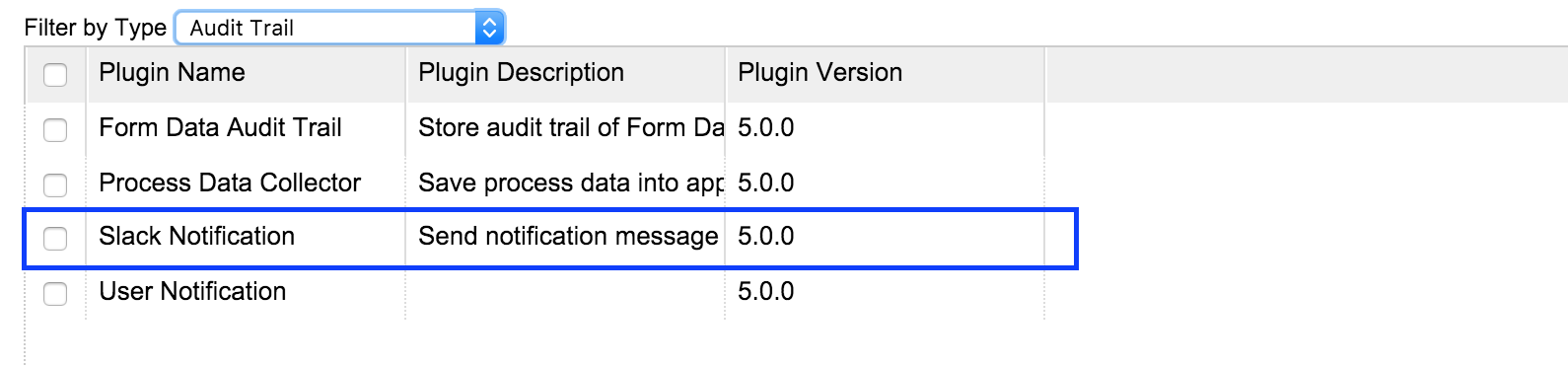
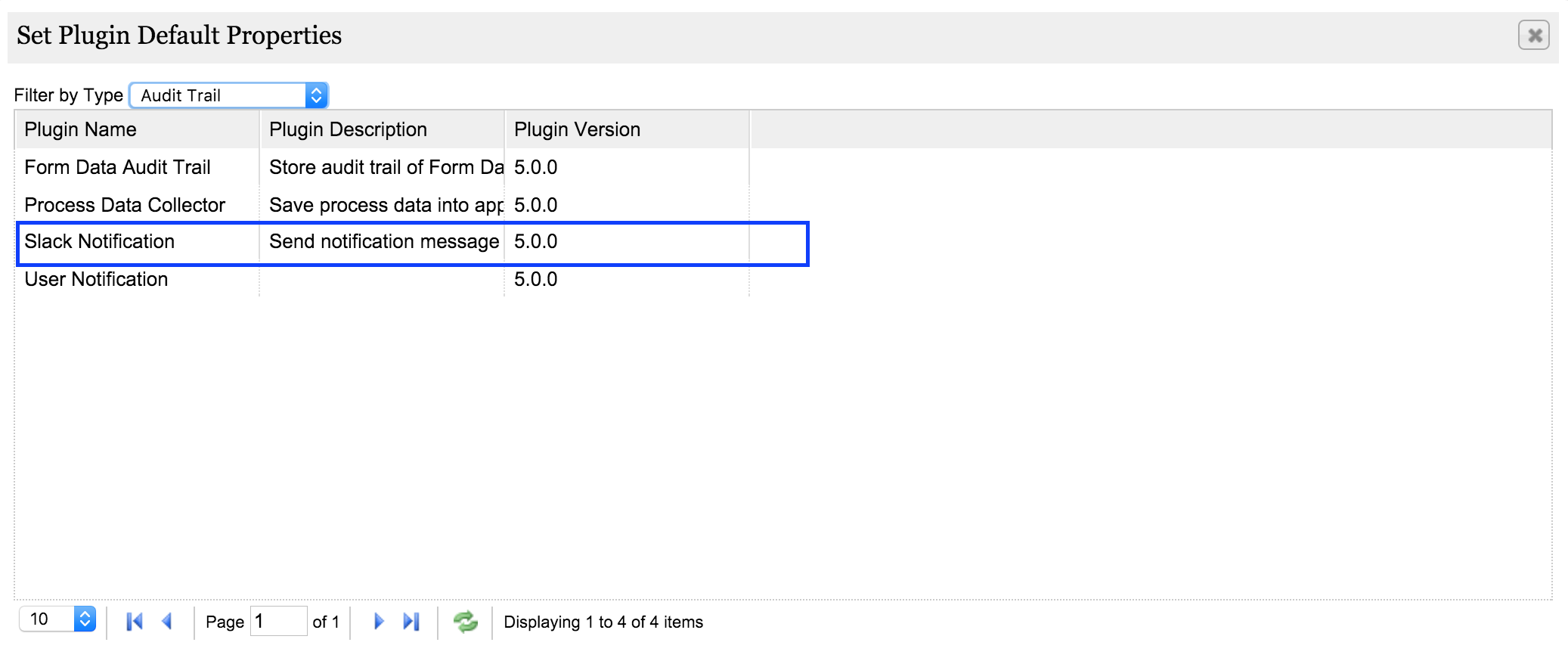
Check the Slack Notification plugin is available in Plugin Default Properties.
ตรวจสอบว่าปลั๊กอินการแจ้งเตือน Slack มีอยู่ใน Plugin Default Properties
Now, let us configure the Incoming Webhooks in Slack platform.
ตอนนี้ให้เรากำหนดค่าเว็บรับเข้าในแพลตฟอร์ม Slack
Search for Incoming WebHook and click in
Addค้นหา WebHook ที่เข้ามาและคลิกที่ Add
Choose Channel to Post and press
Add Incoming WebHooks Integrationเลือกช่องทางที่จะโพสต์และกดเพิ่มการผนวก WebHooks
Into Setup Instructions, you've a WebHook URL. This is the argument will use for the "Webhook URL" later. Then, copy it.
ในคำแนะนำในการตั้งค่าคุณคือ URL ของ WebHook นี่คืออาร์กิวเมนต์ที่จะใช้สำหรับ "Webhook URL" ในภายหลัง จากนั้นคัดลอก
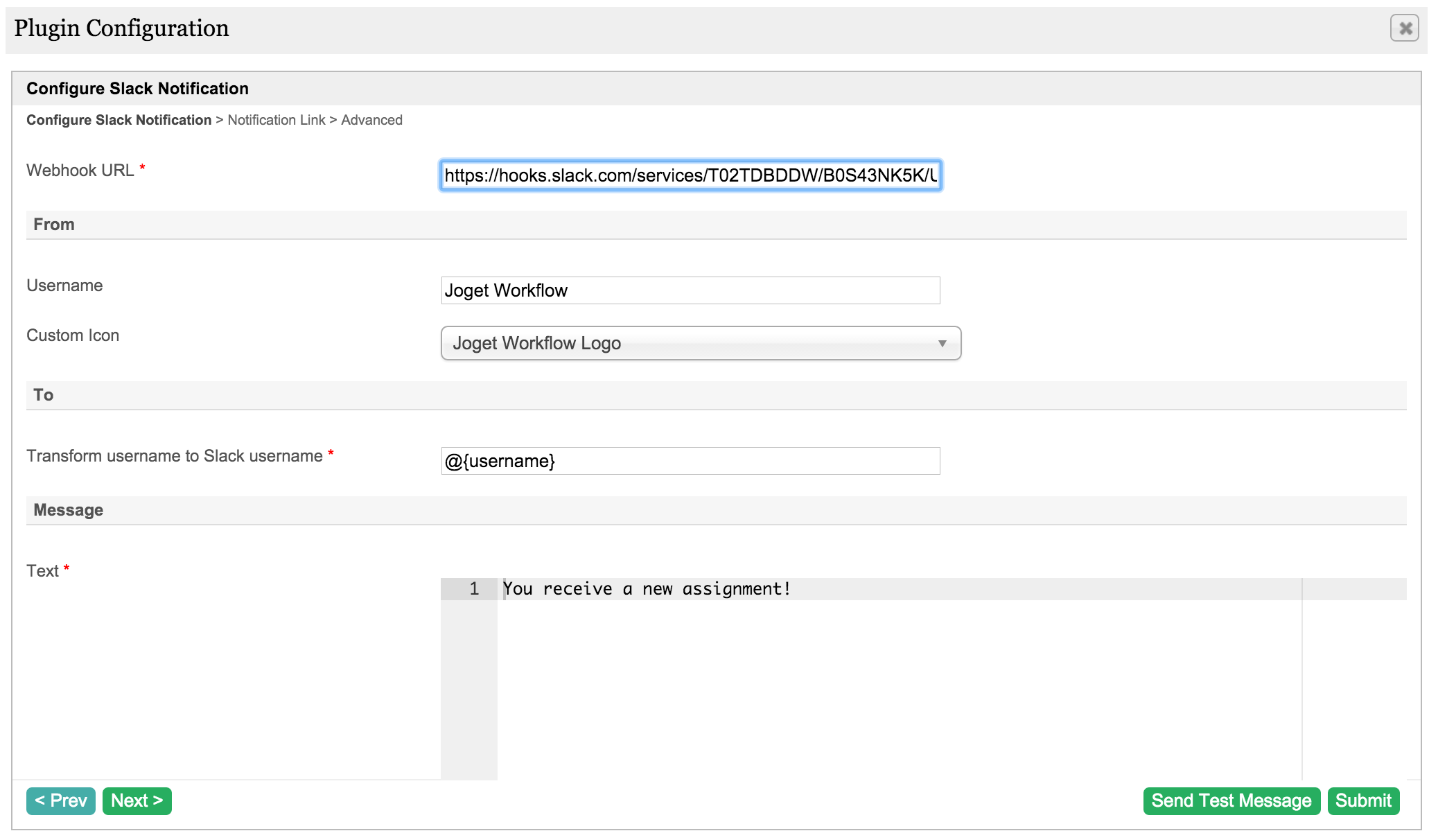
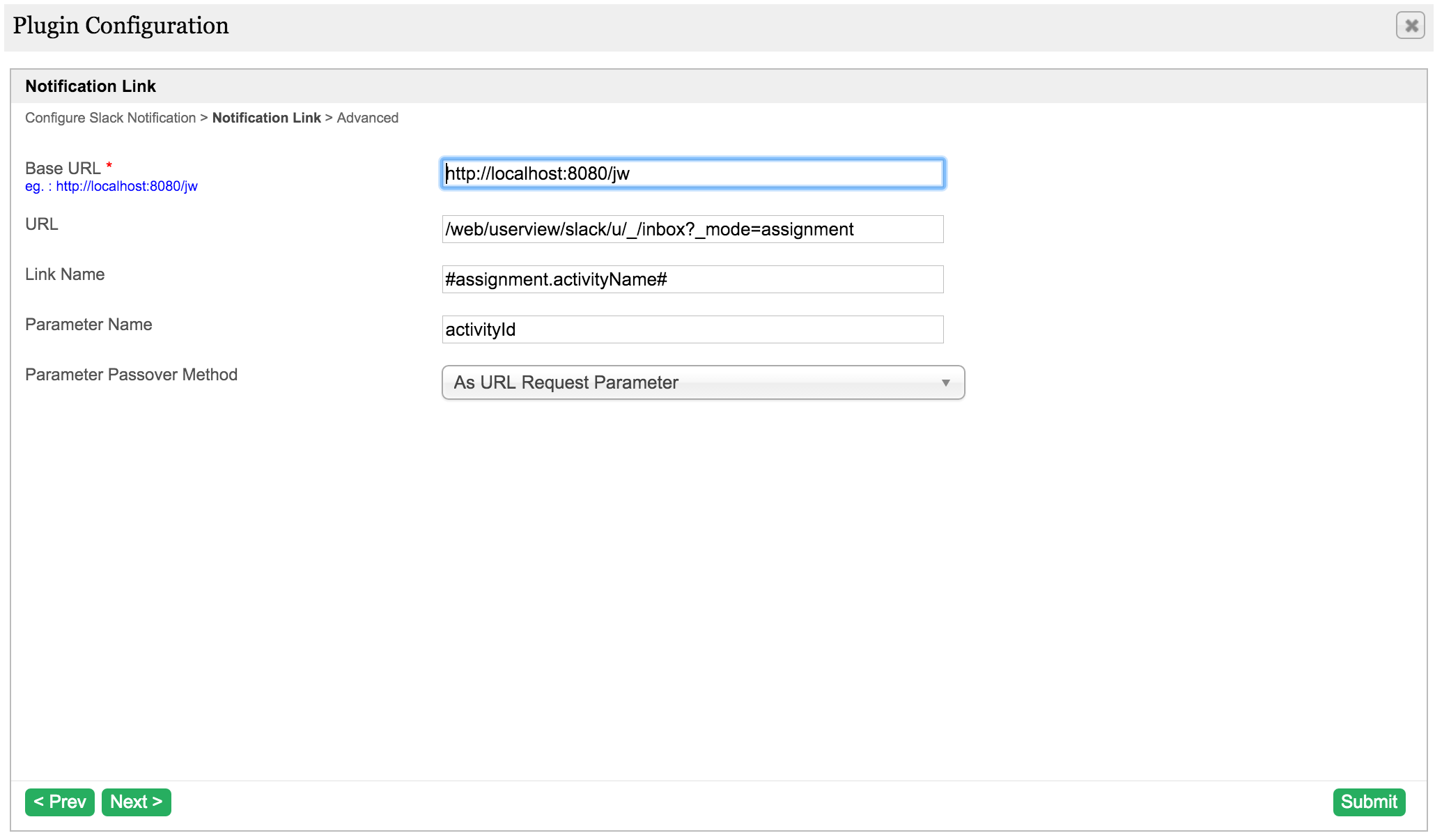
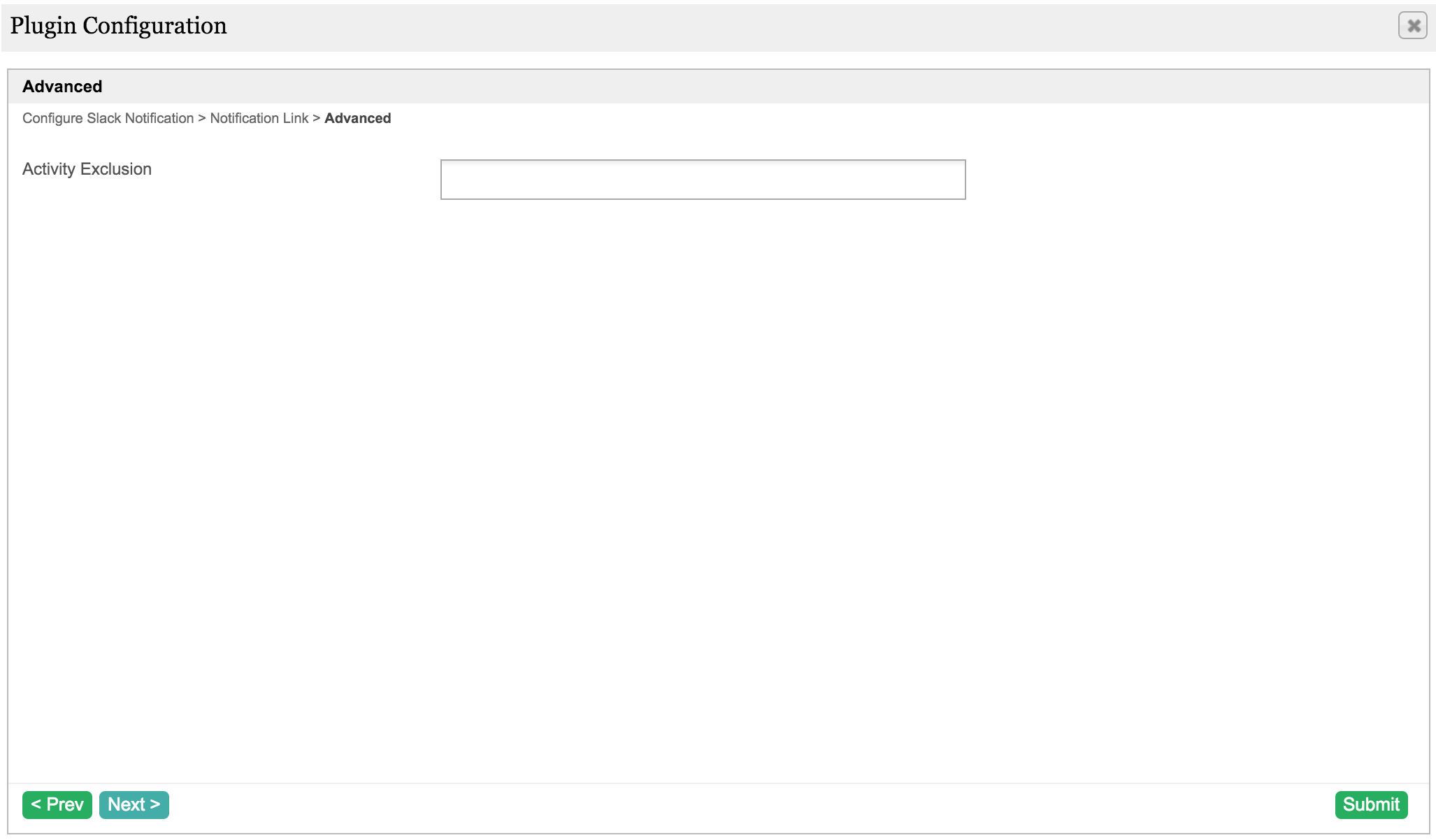
Configure the Slack Notification plugin. We can see the properties options are quite similar to User Notification Plugin plugin.
กำหนดค่าปลั๊กอินการแจ้งเตือน Slack เราสามารถเห็นตัวเลือกคุณสมบัติค่อนข้างคล้ายกับปลั๊กอิน User Notification Plugin
When test running a process, the message is received in Slack once a new assignment is created.
เมื่อทดสอบการทำงานกระบวนการข้อความจะได้รับใน Slack เมื่อมีการสร้างการมอบหมายใหม่

8. Take a step further, share it or sell it
ก้าวไปอีกขั้นแบ่งปันหรือขายมัน
To download the ready-to-use plugin jar, please find it in http://marketplace.joget.org/. (Coming Soon)
คุณสามารถดาวน์โหลดซอร์สโค้ดจาก slack_notification_src.zip หากต้องการดาวน์โหลด jar ปลั๊กอินที่พร้อมใช้งานโปรดค้นหาได้ที่ http://marketplace.joget.org/ (เร็ว ๆ นี้)