1
0
-1
5 answers
- 210
Hi Sylwester,
- First, let us make the forms relation clear. You have 3 forms "ht_cpo", "ht_cpo_inv" and "ht_cpo_item".
- The data of "ht_cpo" and "ht_cpo_item" forms are imported through the Import Menu of "Import CPO header data" and "Import CPO item data".
- The Id of "ht_cpo" form is equal to "cpo_cpo_number".
- The data of "ht_cpo_item" form related to "ht_cpo" form with "cpo_item_cpo_no" field. Here, you need to make a correction in "ht_cpo" form. The "Foreign Key" of your "CPO Items" grid is configured to "ht_cpo_item_key" which should be "cpo_item_cpo_no" instead. (This will solve your imported cop items does not show up in grid issue.)

I understand that you would like to make thing simple and do not want to use a process flow in your app. The followings are what you can do.
In "ht_cpo" form, you can go to Form Properties. There is a "Post Processing Tool" option which you can mapped to a Email Tool. You can configure the "Post Processing Tool" to run on "Both date creation and update".
By configure it this way, you will get an email when each "ht_cpo" form data are imported through "Import CPO header data" menu and also when someone are updating the "ht_cpo" form through CRUD menu.
Hope it helps.
Add your comment... - 210
Hi,
From your app, there is no process flow is designed. You can refer to Design Process.
Please refer to my answer in bold.
- Can I design whole process using only one form? I mean the same form mapped to multiple activities?
Yes. It is allowed to use one form and mapped to every process activities. - How can I add notification emails after field "status" will be changed in the form?
To send notification/email, you can add a tool activity in your process flow and mapped it with a Email Tool. - How can I send notification mail after import tool will finish uploading CPO data - done one a weekly basis by Coordinator?
In your app, you are using Import Menu. You can set the "Post Processing Tool" in Form Properties of your chosen form to send email. But, please not that this will be execute for each imported data.
If you modify it to use Import Tool in a process, you can add another tool activity right after the import data tool activity to send email.
Some possible mistakes I noticed as below:
- There are no process flow designed. It is manually control through CRUD Menu.
- In "ht_cpo" form, you have 2 grids. The reference field ids for this 2 grids are "cpo_inv_id" and "ht_cpo_item_key". But, I can't seem to find this 2 values are imported from the Import Menu.
Add your comment... - Can I design whole process using only one form? I mean the same form mapped to multiple activities?
- 10-1
Hi Owen,
thanks for your continuous support.
I have fixed an issue with ht_cpo and ht_cpo_item. Import tool works fine. Post Processing Tool also, but email is send every time when form is updated and saved - this does not fix my issue as I would like to have outgoing email only when field "status" in ht_cpo has been changed to speciefic status. Any solution for this?
So I believe I would need to use a process, however I'm facing an issue that I dont know how to start the process for ht_cpo form which contains imported data. It's not an issue to run the process for "blank/new" ht_cpo form.
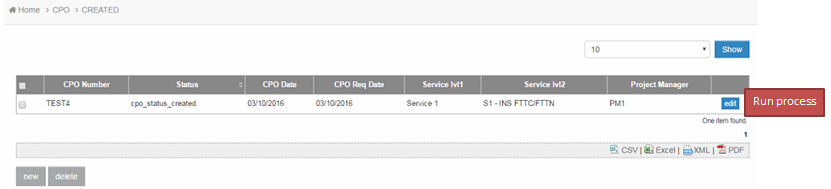
Imported data - datalist view - ht_cpo:
Imported data - form view - ht_cpo:
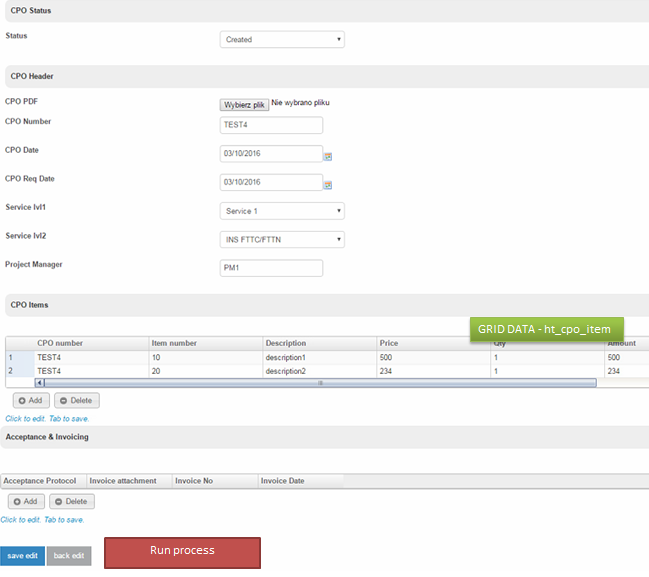
Here I would like to have a Run process button or some other solution that will start the process with imported data.
The process itself look's fine and everything works, but only for "new" ht_cpo form which needs to be filled manually and through Userview -> Run Process.
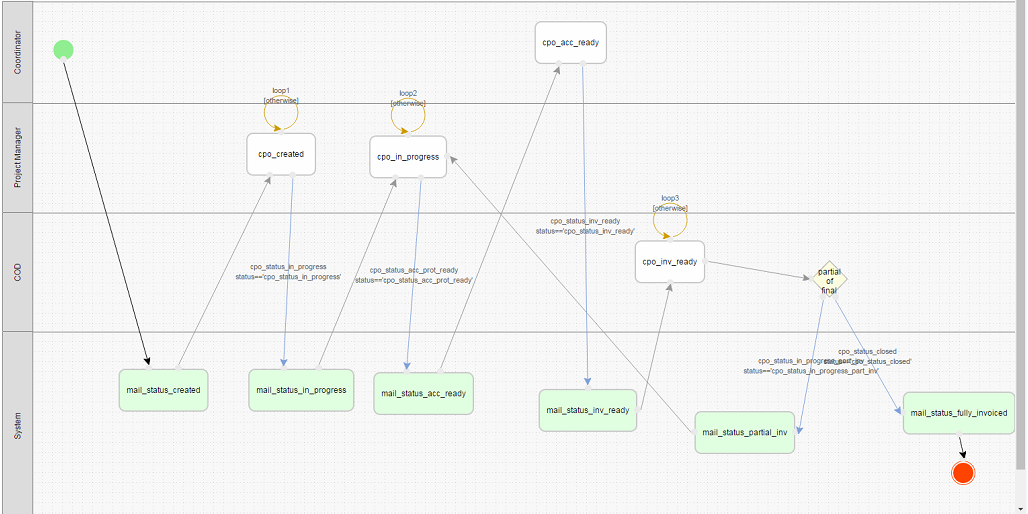
BR,
Sylwester
- Anders
Hi, you could try this article http://dev.joget.org/community/display/KBv5/Start+Process+from+Datalist+Hyperlink+Action
- Sylwester Nowak
Hi Anders, unfortunately it's not what I need. I have found out partial solution for this one: http://dev.joget.org/community/display/KBv5/Bean+Shell+Programming+Guide#BeanShellProgrammingGuide-UseasProcessTool - Start a new process in the same app with current record id - Bean Shell with Post Processing Tool - but still need to evaluate this topic.
Add your comment... - 10-1
Hi Owen,
thanks for your response! Still I have some questions regarding this one.
How can I achieve below...
- Through Import Menu (here I can do it without running any process) or through Import Tool (here I have added new form to store data in xls "File upload form" and defined short process to upload data to table CPO "Store data form") I'm uploading data for eg. 20 CPO's.
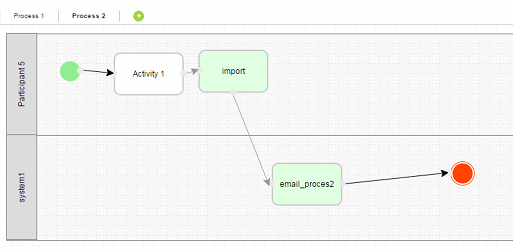
Example of data in excel:
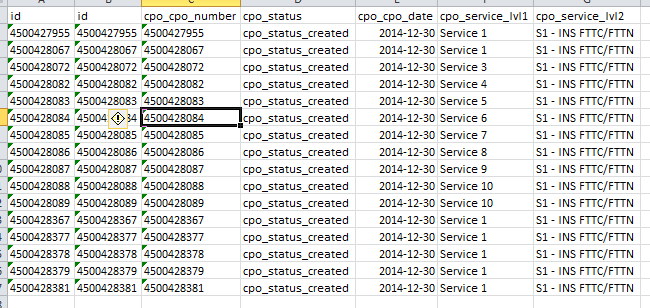
After uploading through Import Menu or through Import Tool I have uploaded data into CPO table, so this is the first step.
Now what I would to achieve is to start running the process for each CPO record that has been uploaded (I believe this will be 2nd process already).
I have used Datalist, Start Process from Datalist Hyperlink Action and CRUD to build "Run process" hyperlink but...
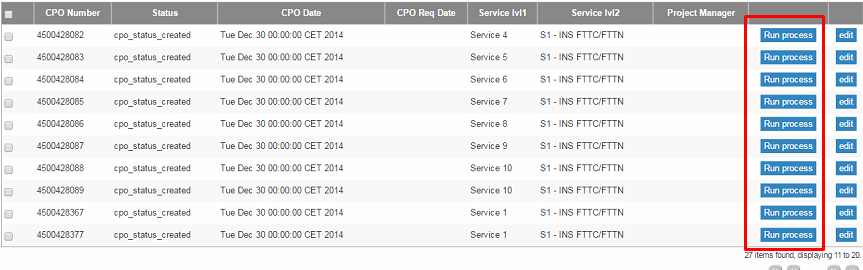
- Data uploaded through Import Menu or Import Tool, click Run process (hyperlink)

2. Form with new process popsup, submit button
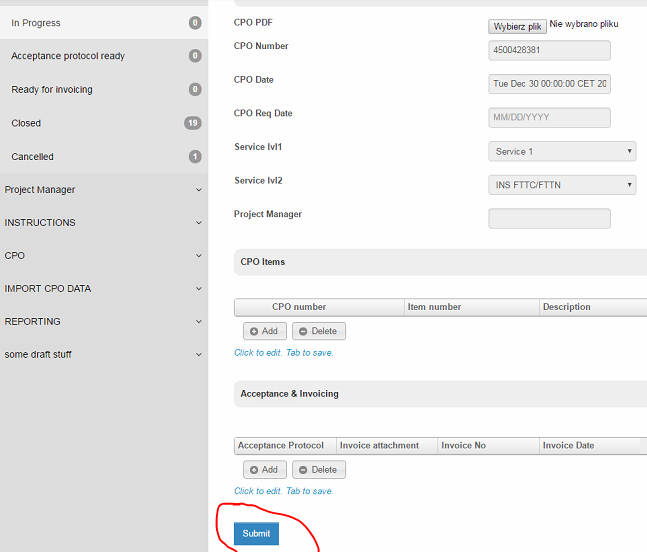
3. New item with process has been created - with the same data as imported form, but without grid data

The questions are:
- how I can "translate" imported item into process, not to create new one record?
SQL from DB:

- The next thing is that item created in the process don't have any references to a grid data that was included in CPO, how to achieve it?
- For me manual control through CRUD Menu would work if there's any notification email (without running a process).
Thanks,
Sylwester
Add your comment... - 10-1Add your comment...


Hi All,
I'm new to Joget and currently checking the possibilities of this software before buying license.
We need to develop an application that will handle ordering and invoicing process within one of the projects in our company.
Before I will ask speciefic questions please have a look at below.
Form:
I have created 3 forms, of which only one will be visible by end user. The most important thing in here is the "Status" and "Project Manager" on CPO header.
User view:
Here I have created different lists for different statuses and with CRUD I have added it to Userview - thanks to this user will be able to track in which status we have speciefic CPO's.
Users:
We will have the following users and groups:
So finally I have something like that like that, I did not touched yet authorizations so eg. Invoicing team will have access to "Invoicing ready" list.
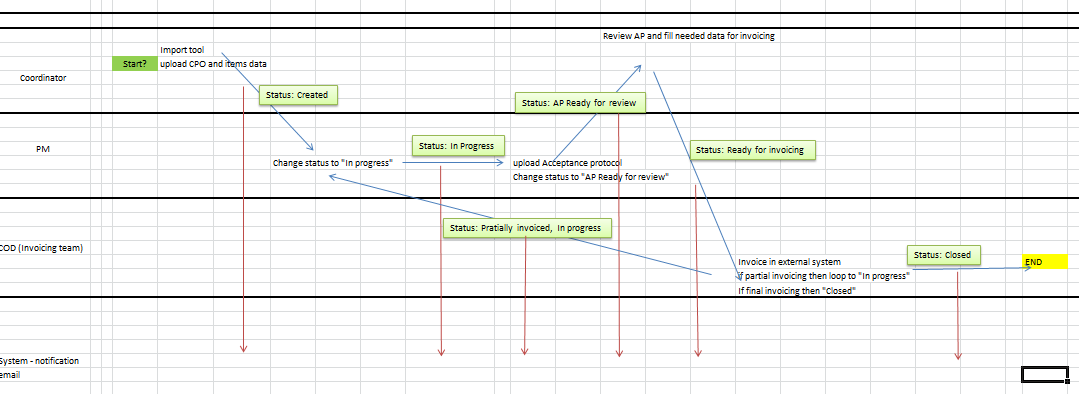
This is the process:
12. Notification mail send to Project Manager and Coordinator about update in the status.
Attached how I see it in excel.
Loading
In one time few thousand items can be opened.
And here we're getting to the point, I fully dont understand how to design the process in Joget, I was looking at instructions but I dont get it - can somebody have a look into attached what has been developed and try to answer my questions please?
APP_HT_MS-1-20160318135922.jwa
Thanks,
Sylwester