Download the desired Tomcat version from its official site. You can click here to get Tomcat 9.
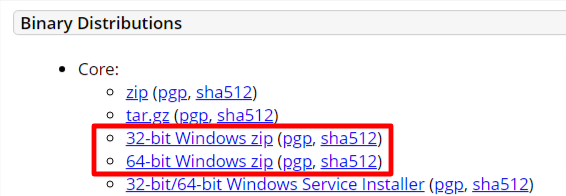
32 or 64 bits?
Make sure that you pick the bundle meant for Windows as highlighted below.
Extract the content and put it into the Joget's installation directory.
In this article, our Joget installation directory is "C:\Joget-DX8\Joget 8.0.5 ENT"
At the time of writing, "apache-tomcat-9.0.80" is the version downloaded.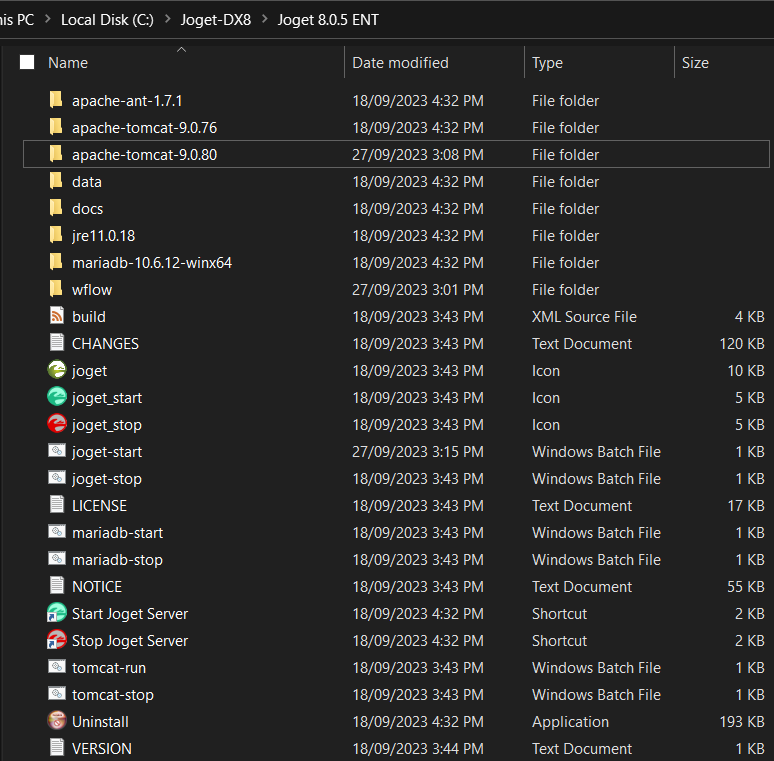
Copy the jw.war from the existing tomcat's webapps folder into the new one (i.e. from \apache-tomcat-9.0.76\webapps to \apache-tomcat-9.0.80\webapps)
Optional step: If you ever plan to start up Joget manually next time by running the usual batch file or through Windows Start Menu, you can modify joget.start to point to the new tomcat folder.
Existing codeset CATALINA_HOME=.\apache-tomcat-9.0.76
New codeset CATALINA_HOME=.\apache-tomcat-9.0.80
Open up \apache-tomcat-9.0.80\bin in your command prompt.
Run "service.bat install service_name Tomcat9JogetDX"
Command PromptC:\Joget-DX8\Joget 8.0.5 ENT\apache-tomcat-9.0.80\bin>service.bat install service_name Tomcat9JogetDX Installing the service 'Tomcat9JogetDX' ... Using CATALINA_HOME: "C:\Joget-DX8\Joget 8.0.5 ENT\apache-tomcat-9.0.80" Using CATALINA_BASE: "C:\Joget-DX8\Joget 8.0.5 ENT\apache-tomcat-9.0.80" Using JAVA_HOME: "C:\Program Files\Java\jdk-11" Using JRE_HOME: "C:\Program Files\Java\jdk-11" Using JVM: "C:\Program Files\Java\jdk-11\bin\server\jvm.dll" The service 'Tomcat9JogetDX' has been installed.
To verify, you may check in Computer Management -> Services.

Get back to the \apache-tomcat-9.0.80\bin folder. From the command prompt, run the command tomcat9w.exe //ES/Tomcat9JogetDX

- Navigate to the Log On tab. The default value "Local Service" is known to not provide enough permission to run Joget. Change it by changing to using a local system account / local user account to run the service. Please read https://stackoverflow.com/a/63907950 for more information.
Go to the Logging tab. Verify that the Log path is pointing to the correct location, by default, it should point it back to the logs folder of the current Tomcat already.
Select the level of logging you wish for in the level drop-down list.

Next, go to the Java tab, change the JavaVirtual Machine file path to the file path shown below, and append the following lines in the Java Options field. This is to define the wflow home folder from where Joget will run. At the same time, configure the maximum memory pool accordingly (i.e. 1024).
Append these lines-Dwflow.home=C:\Joget-DX8\Joget 8.0.5 ENT\wflow -javaagent:C:\Joget-DX8\Joget 8.0.5 ENT\wflow\aspectjweaver-1.9.7.jar -javaagent:C:\Joget-DX8\Joget 8.0.5 ENT\wflow\glowroot\glowroot.jar

Go to the startup tab, and set the working path to your Joget's installation folder. Set the Mode to Java. Repeat it for the shutdown tab too.

You can now start up Joget as a service.
After you have successfully added Tomcat as a service, you may also want to add MySQL as a service and make Tomcat dependent on MySQL as well.
Reference: Apache Tomcat 9 - Windows service HOW-TO