License Error
The license of the app Translations for Confluence (formerly Language Macros) has expired. Please renew the license.
License Error
The license of the app Translations for Confluence (formerly Language Macros) has expired. Please renew the license.
Installation Steps
License Error
The license of the app Translations for Confluence (formerly Language Macros) has expired. Please renew the license.
License Error
The license of the app Translations for Confluence (formerly Language Macros) has expired. Please renew the license.
Run the setup file joget-setup-x.x.x.exe to launch the Setup Wizard.
License Error
The license of the app Translations for Confluence (formerly Language Macros) has expired. Please renew the license.
License Error
The license of the app Translations for Confluence (formerly Language Macros) has expired. Please renew the license.
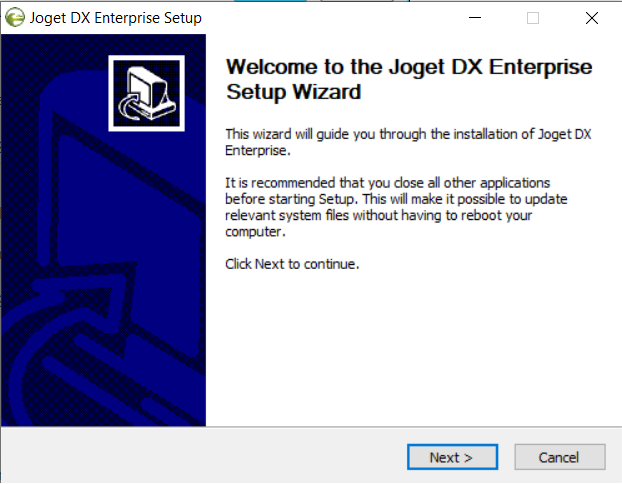
Click on Next on the Introduction page, I Agree on the License page, and Next on the Components page.
License Error
The license of the app Translations for Confluence (formerly Language Macros) has expired. Please renew the license.
License Error
The license of the app Translations for Confluence (formerly Language Macros) has expired. Please renew the license.
Change the Destination folder if required, then, click on Install. Once the installation is complete, click on Finish.
License Error
The license of the app Translations for Confluence (formerly Language Macros) has expired. Please renew the license.
License Error
The license of the app Translations for Confluence (formerly Language Macros) has expired. Please renew the license.
To start the Joget Server, go to Start Menu > Programs > Joget DX and click on the green Start Joget Server icon under Joget Workflow. The startup might take some time, so please wait until the message "INFO: Server startup in XXXX ms" appears (XXXX represents the time taken for the startup). Do not close the command window.
License Error
The license of the app Translations for Confluence (formerly Language Macros) has expired. Please renew the license.
License Error
The license of the app Translations for Confluence (formerly Language Macros) has expired. Please renew the license.
Access the App Center at http://localhost:8080/jw OR Go to Start Menu > Programs > Joget DX and click on App Center. This will launch the App Center in a web browser.
License Error
The license of the app Translations for Confluence (formerly Language Macros) has expired. Please renew the license.
License Error
The license of the app Translations for Confluence (formerly Language Macros) has expired. Please renew the license.
Follow on with Setting Up Database.
License Error
The license of the app Translations for Confluence (formerly Language Macros) has expired. Please renew the license.
License Error
The license of the app Translations for Confluence (formerly Language Macros) has expired. Please renew the license.
To stop the Joget Server, go to Start Menu > Programs > Joget DX and click on the red Stop Joget Server icon under Joget Workflow.
License Error
The license of the app Translations for Confluence (formerly Language Macros) has expired. Please renew the license.
License Error
The license of the app Translations for Confluence (formerly Language Macros) has expired. Please renew the license.