Introduction
Recently, there have been questions from customers, partners and the community asking for comparisons between Joget Workflow and Microsoft SharePoint. Actually, the two products are not competing, but in fact complement each other.
SharePoint is a web application portal platform for team collaboration, intranets and enterprise document and content management. While it is possible to extend the capabilities of SharePoint through apps, developing apps for SharePoint is not easy as it requires traditional programming, as described in the SharePoint 2013 development overview article at https://msdn.microsoft.com/en-us/library/office/jj164084.aspx.
On the other hand, Joget is a platform to easily build web apps and automate processes. With single sign-on (SSO) integration from SharePoint to Joget, organizations can easily extend the capability of SharePoint by allowing users to seamlessly access custom apps, visually design their own custom applications, or download ready made apps from the Joget Marketplace.
This article describes how SSO can be achieved using Active Directory Federation Services (https://msdn.microsoft.com/en-us/library/bb897402.aspx), which supports the Security Assertion Markup Language (SAML) standard.
License Error
The license of the app Translations for Confluence (formerly Language Macros) has expired. Please renew the license.
Configuring Joget SharePoint SSO
License Error
The license of the app Translations for Confluence (formerly Language Macros) has expired. Please renew the license.
i. Pre-requisites
License Error
The license of the app Translations for Confluence (formerly Language Macros) has expired. Please renew the license.
Before configuring the SharePoint-Joget SSO integration, you will need to have installed and configured:
License Error
The license of the app Translations for Confluence (formerly Language Macros) has expired. Please renew the license.
License Error
The license of the app Translations for Confluence (formerly Language Macros) has expired. Please renew the license.
License Error
The license of the app Translations for Confluence (formerly Language Macros) has expired. Please renew the license.
Joget
License Error
The license of the app Translations for Confluence (formerly Language Macros) has expired. Please renew the license.
The appendices provide some resources on installing and configuring these pre-requisites.
License Error
The license of the app Translations for Confluence (formerly Language Macros) has expired. Please renew the license.
License Error
The license of the app Translations for Confluence (formerly Language Macros) has expired. Please renew the license.
Export AD FS Token Signing Certificate
License Error
The license of the app Translations for Confluence (formerly Language Macros) has expired. Please renew the license.
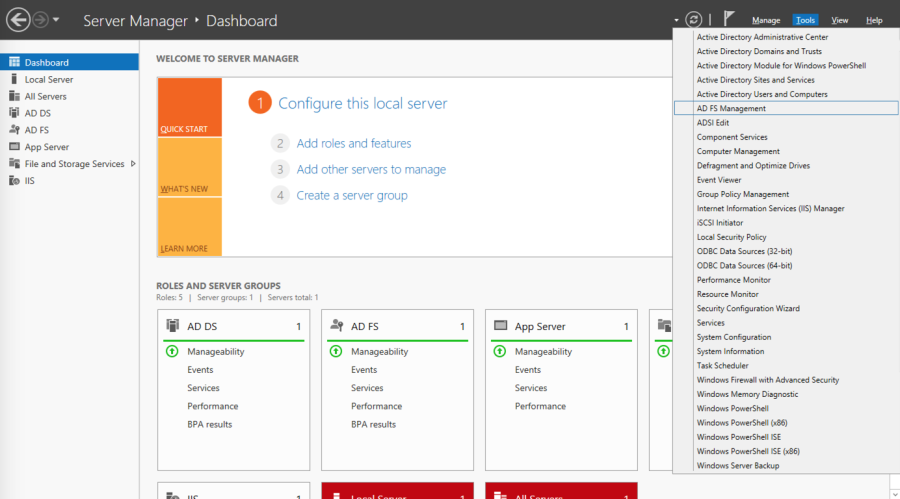
In the Windows Server Manager, launch Tools > AD FD Management
License Error
The license of the app Translations for Confluence (formerly Language Macros) has expired. Please renew the license.
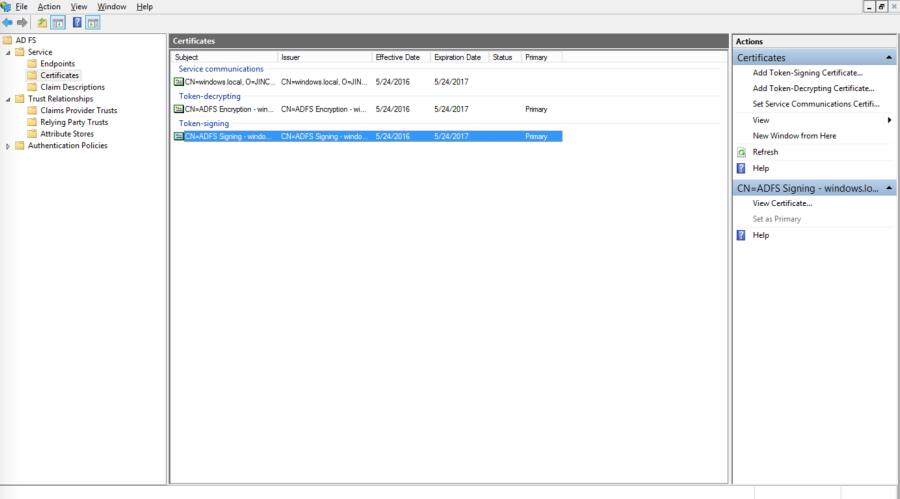
In the AD FS Management console, select Service > Certificates in the left navigation pane.
License Error
The license of the app Translations for Confluence (formerly Language Macros) has expired. Please renew the license.
Select the Token-signing certificate and click on the View Certificate link on the right pane.
License Error
The license of the app Translations for Confluence (formerly Language Macros) has expired. Please renew the license.
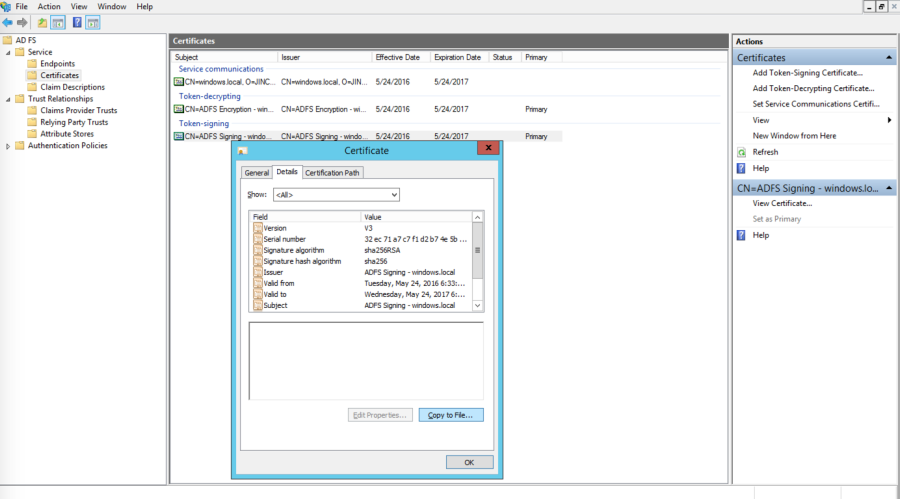
Click on the Details tab, and click on the Copy to File… button
License Error
The license of the app Translations for Confluence (formerly Language Macros) has expired. Please renew the license.
This starts the Certificate Export Wizard. On the Welcome to the Certificate Export Wizard page, click Next.
License Error
The license of the app Translations for Confluence (formerly Language Macros) has expired. Please renew the license.
On the Export Private Key page, click No, do not export the private key, and then click Next.
License Error
The license of the app Translations for Confluence (formerly Language Macros) has expired. Please renew the license.
On the Export File Format page, select Base-64 encoded X.509 (.CER), and then click Next.
License Error
The license of the app Translations for Confluence (formerly Language Macros) has expired. Please renew the license.
On the File to Export page, type the name and location of the file that you want to export, and then click Next. For example, enter C:\ADFS.cer.
License Error
The license of the app Translations for Confluence (formerly Language Macros) has expired. Please renew the license.
On the Completing the Certificate Export Wizard page, click Finish.
License Error
The license of the app Translations for Confluence (formerly Language Macros) has expired. Please renew the license.
License Error
The license of the app Translations for Confluence (formerly Language Macros) has expired. Please renew the license.
Download the SAML Directory Manager from the Joget Marketplace
License Error
The license of the app Translations for Confluence (formerly Language Macros) has expired. Please renew the license.
In Joget, login as an administrator
License Error
The license of the app Translations for Confluence (formerly Language Macros) has expired. Please renew the license.
In Settings > Manage Plugins, click on Upload Plugin. Select the downloaded JAR file and click on the Upload button to upload the downloaded JAR file
License Error
The license of the app Translations for Confluence (formerly Language Macros) has expired. Please renew the license.
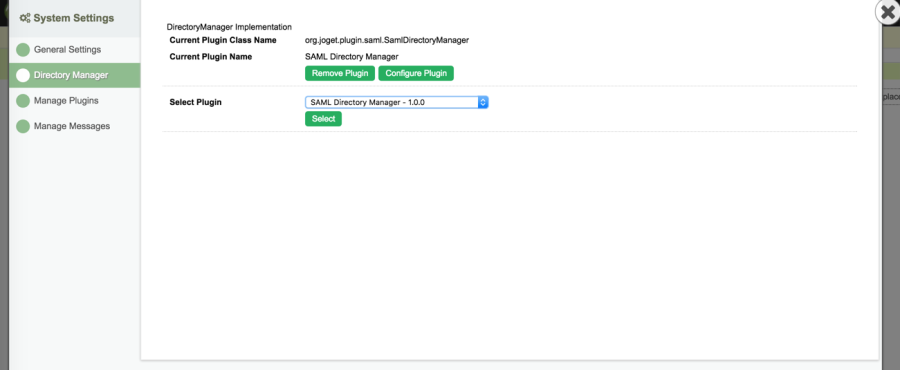
In Settings > Directory Manager, choose the SAML Directory Manager and click on Select.
License Error
The license of the app Translations for Confluence (formerly Language Macros) has expired. Please renew the license.
Open the contents of the exported AD FS certificate in a text editor and copy the contents.
License Error
The license of the app Translations for Confluence (formerly Language Macros) has expired. Please renew the license.
In the Plugin Configuration page, paste the contents into the IDP Certificate field (copy-paste without the BEGIN and END lines)
License Error
The license of the app Translations for Confluence (formerly Language Macros) has expired. Please renew the license.
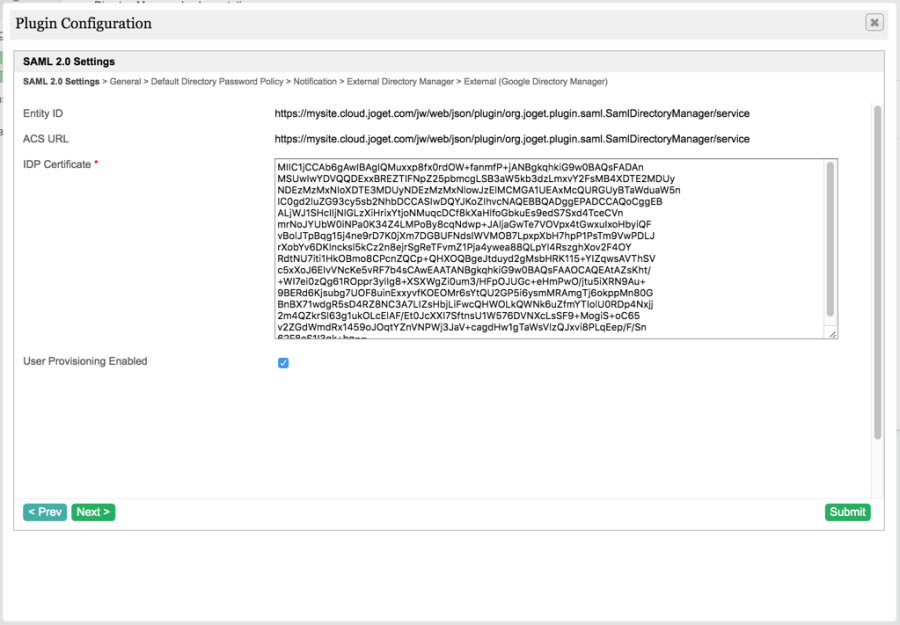
Copy the value of the ACS URL (to be used in AD FS configuration later).
License Error
The license of the app Translations for Confluence (formerly Language Macros) has expired. Please renew the license.
With User Provisioning Enabled checked, a user will be created on first login if the username does not already exist. To integrate with Active Directory directly to retrieve users and groups, configure the External Directory Manager to LDAP Directory Manager https://dev.joget.org/community/display/KBv5/LDAP+Directory+Manager
License Error
The license of the app Translations for Confluence (formerly Language Macros) has expired. Please renew the license.
Click on Submit to save the settings.
License Error
The license of the app Translations for Confluence (formerly Language Macros) has expired. Please renew the license.
License Error
The license of the app Translations for Confluence (formerly Language Macros) has expired. Please renew the license.
Add Relying Party Trust
License Error
The license of the app Translations for Confluence (formerly Language Macros) has expired. Please renew the license.
In the Windows Server Manager, launch Tools > AD FD Management
License Error
The license of the app Translations for Confluence (formerly Language Macros) has expired. Please renew the license.
In the AD FS Management console, click on Trust Relationships > Relying Party Trusts in the left navigation pane.
License Error
The license of the app Translations for Confluence (formerly Language Macros) has expired. Please renew the license.
In the right page, click on Add Relying Party Trust.
License Error
The license of the app Translations for Confluence (formerly Language Macros) has expired. Please renew the license.
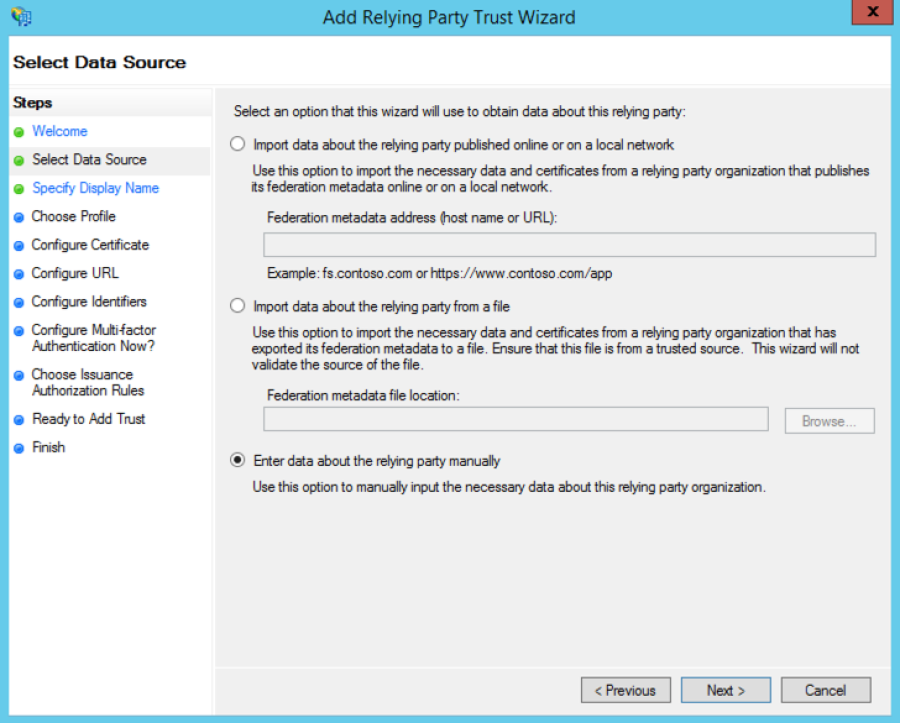
On the Welcome to the Add Relying Party Trust Wizard page, click Start.
License Error
The license of the app Translations for Confluence (formerly Language Macros) has expired. Please renew the license.
Select Enter data about the relying party manually, and then click Next.
License Error
The license of the app Translations for Confluence (formerly Language Macros) has expired. Please renew the license.
Type a relying party name (e.g. Joget) and then click Next.
License Error
The license of the app Translations for Confluence (formerly Language Macros) has expired. Please renew the license.
Make sure Active Directory Federation Services (AD FS) 2.0 Profile is selected, and then click Next.
License Error
The license of the app Translations for Confluence (formerly Language Macros) has expired. Please renew the license.
Do not use an encryption certificate. Click Next.
License Error
The license of the app Translations for Confluence (formerly Language Macros) has expired. Please renew the license.
Click to select the Enable support for the SAML 2.0 WebSSO protocol check box.
License Error
The license of the app Translations for Confluence (formerly Language Macros) has expired. Please renew the license.
In the Relying party SAML 2.0 SSO service URL field, type the URL copied from the Joget SAML Directory Manager earlier, e.g. https://mysite.cloud.joget.com/jw/web/json/plugin/org.joget.plugin.saml.SamlDirectoryManager/service
License Error
The license of the app Translations for Confluence (formerly Language Macros) has expired. Please renew the license.
Paste the URL into the relying party trust identifier, and then click Add. Click Next.
License Error
The license of the app Translations for Confluence (formerly Language Macros) has expired. Please renew the license.
Select Permit all users to access this relying party. Click Next.
License Error
The license of the app Translations for Confluence (formerly Language Macros) has expired. Please renew the license.
On the Ready to Add Trust page, there is no action required, click Next.
License Error
The license of the app Translations for Confluence (formerly Language Macros) has expired. Please renew the license.
On the Finish page, click Close. This opens the Rules Editor Management console.
License Error
The license of the app Translations for Confluence (formerly Language Macros) has expired. Please renew the license.
Edit Claim Rules
License Error
The license of the app Translations for Confluence (formerly Language Macros) has expired. Please renew the license.
On the Issuance Transform Rules tab, click Add Rule.
License Error
The license of the app Translations for Confluence (formerly Language Macros) has expired. Please renew the license.
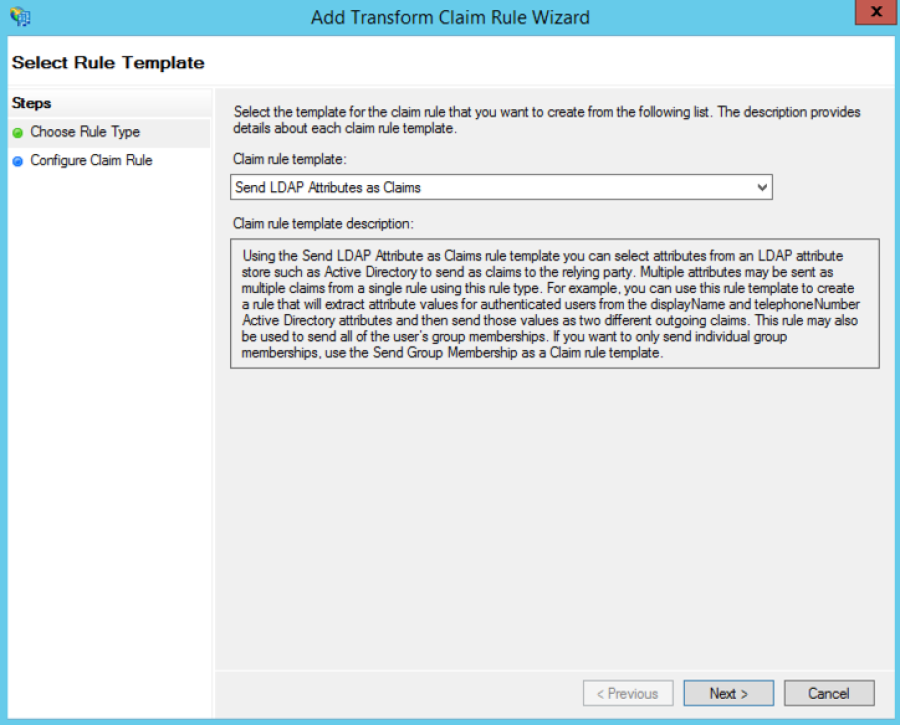
On the Select Rule Template page, select Send LDAP Attributes as Claims. Click Next.
License Error
The license of the app Translations for Confluence (formerly Language Macros) has expired. Please renew the license.
On the Configure Rule page, type the name of the claim rule in the Claim rule name field e.g. User Attributes.
License Error
The license of the app Translations for Confluence (formerly Language Macros) has expired. Please renew the license.
From the Attribute Store drop-down list, select Active Directory.
License Error
The license of the app Translations for Confluence (formerly Language Macros) has expired. Please renew the license.
In the Mapping of LDAP attributes to outgoing claim types section, key in the following mappings:
License Error
The license of the app Translations for Confluence (formerly Language Macros) has expired. Please renew the license.
LDAP Attribute | Outgoing Claim Type |
SAM-Account-Name | Name ID |
E-Mail-Addresses | email |
Given-Name | User.FirstName |
Surname | User.LastName |
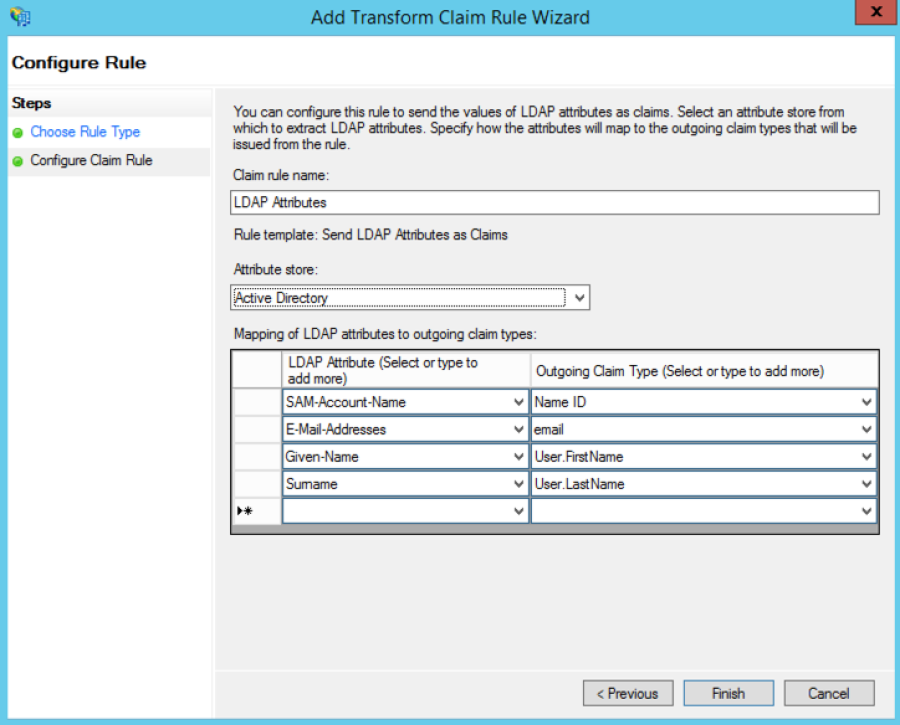
Click Finish, and then click OK.
License Error
The license of the app Translations for Confluence (formerly Language Macros) has expired. Please renew the license.
At this point, the SSO should be operational. Test the login by accessing the the AD FS login page e.g. https://windows.local/adfs/ls/idpinitiatedsignon.aspx
License Error
The license of the app Translations for Confluence (formerly Language Macros) has expired. Please renew the license.
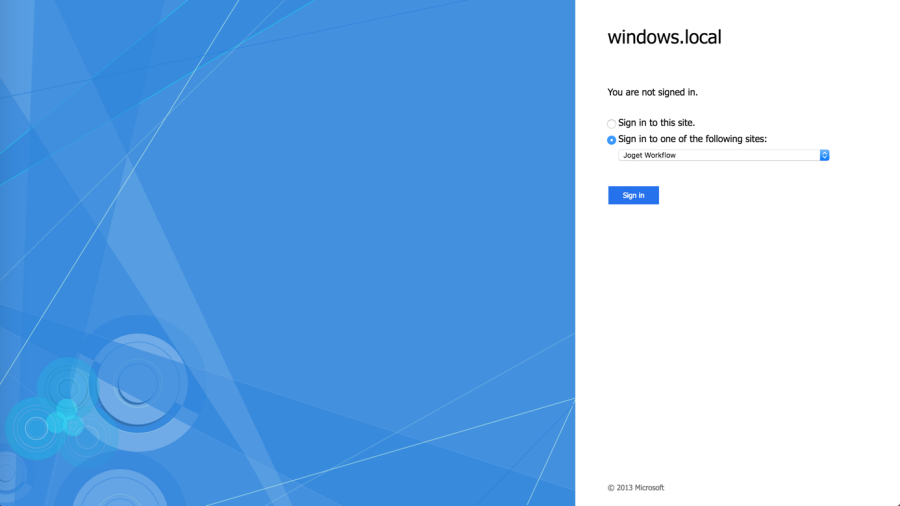
Select the appropriate site e.g. Joget and click on Sign in.
License Error
The license of the app Translations for Confluence (formerly Language Macros) has expired. Please renew the license.
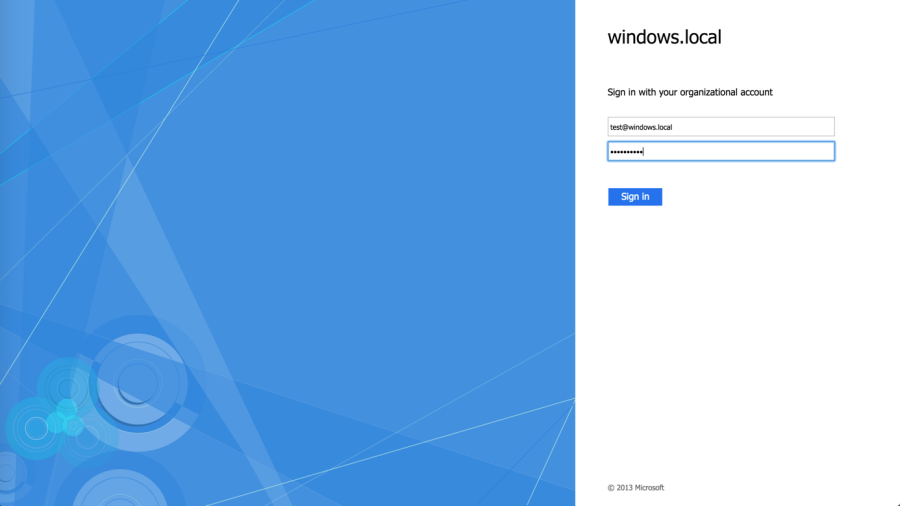
Login to SharePoint using your AD account
License Error
The license of the app Translations for Confluence (formerly Language Macros) has expired. Please renew the license.
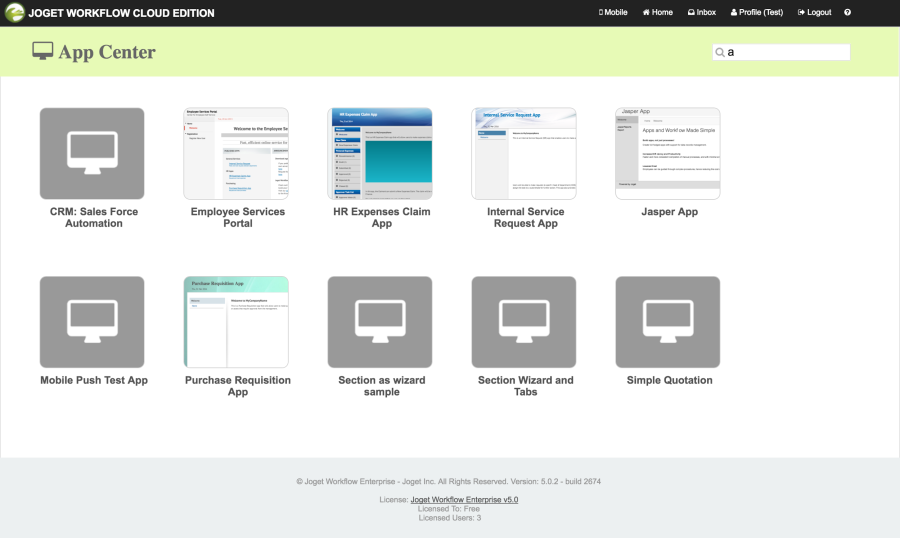
On successful login, you should be automatically logged into Joget
License Error
The license of the app Translations for Confluence (formerly Language Macros) has expired. Please renew the license.
iv. Add Link in SharePoint site
License Error
The license of the app Translations for Confluence (formerly Language Macros) has expired. Please renew the license.
In SharePoint, click on Edit Links in the left menu
License Error
The license of the app Translations for Confluence (formerly Language Macros) has expired. Please renew the license.
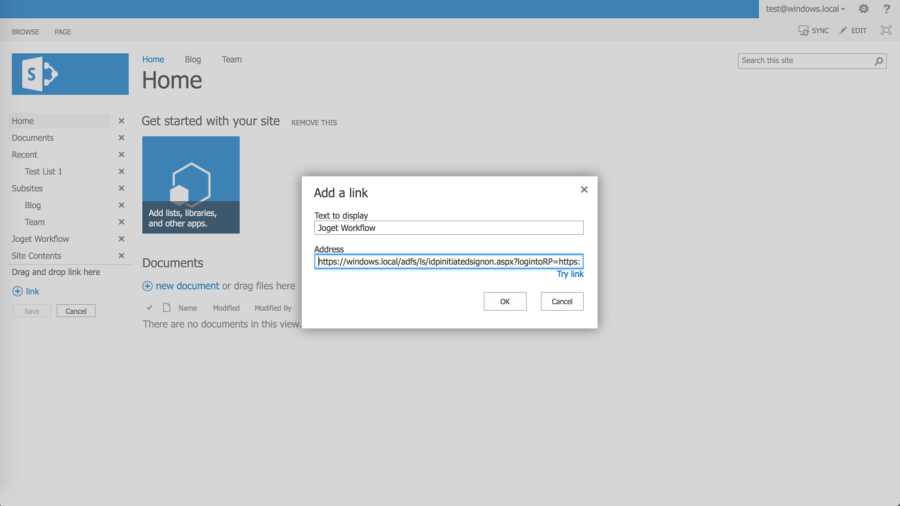
Click on  link, and key in the text to display (e.g. Joget) and the direct SSO link e.g. assuming the AD FS server is https://windows.local and the Joget server is https://mysite.cloud.joget.com, the link will be https://windows.local/adfs/ls/idpinitiatedsignon.aspx?logintoRP=https://mysite.cloud.joget.com/jw/web/json/plugin/org.joget.plugin.saml.SamlDirectoryManager/service
License Error
The license of the app Translations for Confluence (formerly Language Macros) has expired. Please renew the license.
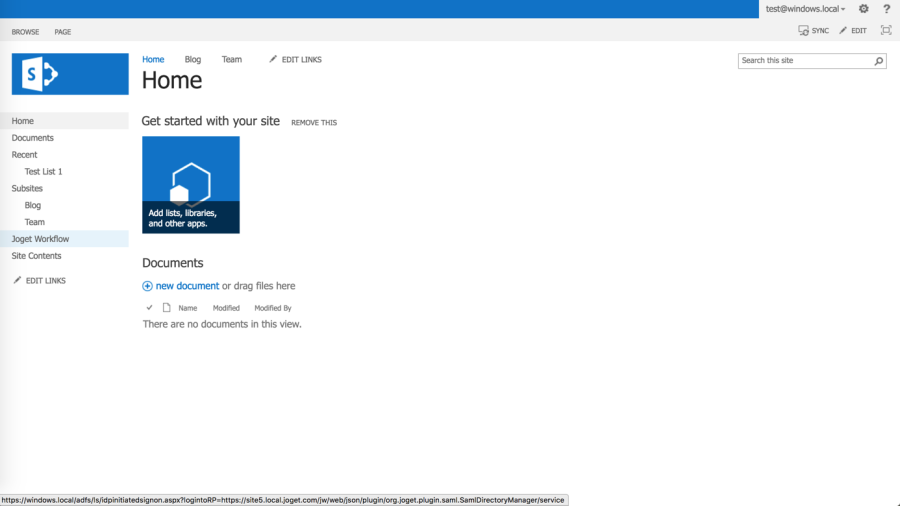
Once the link is created, clicking on the link will SSO the user into the Joget installation.
License Error
The license of the app Translations for Confluence (formerly Language Macros) has expired. Please renew the license.
Appendix: Resources for Installing Pre-requisites
License Error
The license of the app Translations for Confluence (formerly Language Macros) has expired. Please renew the license.
Install SharePoint Foundation 2013
License Error
The license of the app Translations for Confluence (formerly Language Macros) has expired. Please renew the license.
Download SharePoint Foundation 2013: https://www.microsoft.com/en-us/download/details.aspx?id=35488
License Error
The license of the app Translations for Confluence (formerly Language Macros) has expired. Please renew the license.
Install SharePoint 2013 on a single server with a built-in database: https://technet.microsoft.com/en-us/library/cc263202.aspx
License Error
The license of the app Translations for Confluence (formerly Language Macros) has expired. Please renew the license.
Fix SharePoint installation issues on Windows 2012 R2:
License Error
The license of the app Translations for Confluence (formerly Language Macros) has expired. Please renew the license.
- http://www.someshinyobject.com/posts/server-2012-r2-and-sharepoint-2013-the-tool-was-unable-to-install-application-server-role-web
- https://www.axian.com/2014/06/11/sharepoint-2013-configuration-wizard-issues-when-installing-local-development-instance/
- http://sandbox2010.kwizcom.com/sites/demo-data-view-plus/admin-corner-blog/Lists/Posts/Post.aspx?ID=4
Install Active Directory Federation Services (AD FS)
License Error
The license of the app Translations for Confluence (formerly Language Macros) has expired. Please renew the license.
Install the AD FS software on Windows Server 2012 R2: https://msdn.microsoft.com/en-us/library/azure/dn528857.aspx
License Error
The license of the app Translations for Confluence (formerly Language Macros) has expired. Please renew the license.
License Error
The license of the app Translations for Confluence (formerly Language Macros) has expired. Please renew the license.
Configure SAML-based claims authentication with AD FS in SharePoint 2013: https://technet.microsoft.com/en-us/library/hh305235.aspx
License Error
The license of the app Translations for Confluence (formerly Language Macros) has expired. Please renew the license.
Install Joget
License Error
The license of the app Translations for Confluence (formerly Language Macros) has expired. Please renew the license.
Options for installing Joget:
License Error
The license of the app Translations for Confluence (formerly Language Macros) has expired. Please renew the license.
- Install On-Premise: Installation Guide
- Install on Docker: Joget on Docker
- Install on OpenShift: Joget on OpenShift
- Sign up for Joget Workflow On-Demand: https://cloud.joget.com