The following sample script is useful to transform a list that contains many action links into a single dropdown select box.
This solution is tested on the list with list template "Table - Classic" and with "Display Row Actions in Single Column?" enabled.
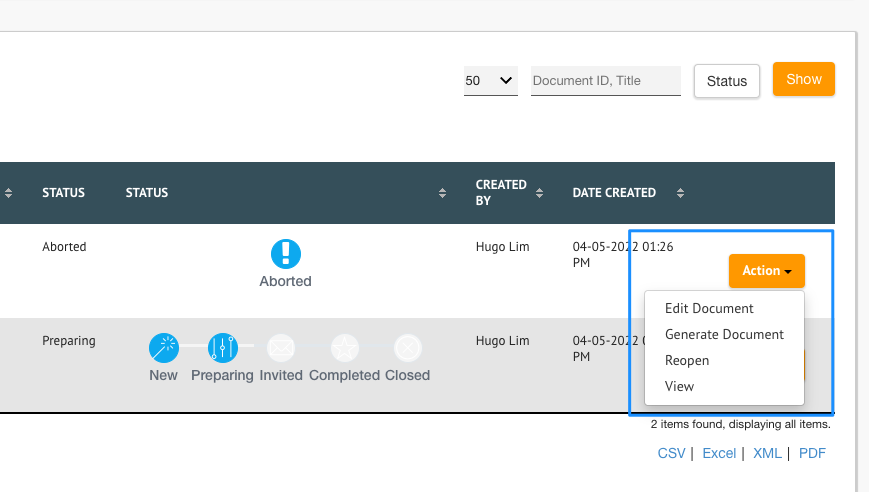
Place these codes in Userview Builder > Settings.
Custom Javascript
window.addEventListener('load', function () {
    //setTimeout(function(){
        $("tbody:visible > tr:visible").each(function(){
            var currentRow = this;
            actionLink = $("li.action-link-modal").clone();

            if($(this).find("td.row_action span.row_action a").size() > 0){
                $(this).find("td.row_action span.row_action a").each(function(){
                    $(actionLink).find("ul").append( "<li>" + $(this).prop("outerHTML") + "</li>");
                    $(this).remove();
                });
                $(currentRow).find("td:last").append( actionLink );
                $(actionLink).removeClass("action-link-modal").show();
            }
        });
    //}, 1000);
}, false);
The script above will affect all datalist in the app. If you want to only apply it to a certain datalist, change line 3 accordingly by prepending the datalist ID.
This is how line 4 will look like after appending the datalist ID.
$("#requestListAll > tbody:visible > tr").each(function(){
Sub Header
<li class="action-link action-link-modal dropdown" style="display: none; list-style: none; margin: 15px;">
    <a data-toggle="dropdown" class="btn dropdown-toggle waves-effect btn waves-button waves-float" aria-expanded="false">
	     Action
	     <span class="caret"></span>
    </a>
    <ul class="dropdown-menu">

    </ul>
</li>
Custom CSS
<style>
/* Style The Dropdown Button */
#list_form > tbody > tr > td.row_action.footable-visible.footable-last-column > li > a {
  background-color: #4CAF50;
  color: white;
  padding: 16px;
  font-size: 16px;
  border: none;
  cursor: pointer;
}

/* The container <div> - needed to position the dropdown content */
#list_form > tbody > tr > td.row_action.footable-visible.footable-last-column > li {
  position: relative;
  display: inline-block;
}

/* Dropdown Content (Hidden by Default) */
.dropdown-menu {
  display: none;
  position: absolute;
  background-color: #f9f9f9;
  min-width: 160px;
  box-shadow: 0px 8px 16px 0px rgba(0,0,0,0.2);
  z-index: 10;
}

/* Links inside the dropdown */
#list_form > tbody > tr > td.row_action.footable-visible.footable-last-column > li > ul > li > a {
  color: black;
  padding: 12px 16px;
  text-decoration: none;
  display: block;
}

/* Change color of dropdown links on hover */
.dropdown-menu a:hover {background-color: #f1f1f1}

/* Need to modify the anchor tag */
.dropdown-menu a {
    color: black;
    padding: 12px 16px;
    text-decoration: none;
    display: block;
}

/* Show the dropdown menu on hover */
#dropdownBtn:hover .dropdown-menu {
  display: block;
}

/* Change the background color of the dropdown button when the dropdown content is shown */
#dropdownBtn:hover .dropbtn {
  background-color: #3e8e41;
}

.dropdown-menu li{
    list-style-type: none !important;
}
</style>
Download Demo App
- APP_datalist_action_selectbox_dx_kb.jwa (For Joget DX Progressive Theme)
- APP_datalist_action_selectbox_xadmin_theme_kb.jwa (For Joget DX X-Admin Theme)