1. Install Prerequisites
Install JDK 11 or JDK 17. Please make sure JAVA_HOME is set.
$ sudo apt-get update
$ sudo apt-get install default-jdk
For more detail, you can refer to https://www.digitalocean.com/community/tutorials/how-to-install-java-on-ubuntu-with-apt-get
Set the JAVA_HOME by editing the file/etc/environment$ sudo nano /etc/environment
In this file, add the following line :
JAVA_HOME="/usr/lib/jvm/java-11-openjdk-amd64"  //For JDK 11

JAVA_HOME="/usr/lib/jvm/java-17-openjdk-amd64"  //For JDK 17
Now reload the file and test:
$ source /etc/environment
$ echo $JAVA_HOME
Install MySQL 5.5 or above.
$ sudo apt-get install mysql-server
$ sudo service mysql start
Install Apache Maven 2.2.1 or above. Please make sure "mvn" command is able to execute from command line.
$ sudo apt-get install maven
$ mvn -version
Install Git.
$ sudo apt-get install git
$ git --version
2. Install 3rd Party Libraries
$ wget https://dev.joget.org/community/download/attachments/19104566/install-libraries.zip
$ unzip -a install-libraries.zip
$ cd install-libraries
$ ./install_linux.sh
$ cd ~
3. Obtain Source
$ mkdir joget_src
$ cd joget_src
$ git clone https://github.com/jogetworkflow/jw-community.git --branch 8.0-SNAPSHOT --depth 1
$ cd ~
4. Configure Datasource for Test Case
Prepare the database for Joget usage.$ mysql -uroot $ create database jwdb; $ exit $ mysql -uroot jwdb < joget_src/jw-community/wflow-install/src/main/resources/data/jwdb-empty.sql
Download wflow.zip and extract in your user home.
$ wget http://dev.joget.org/community/download/attachments/19104566/wflow.zip
$ unzip -a wflow.zip
$ cd wflow
$ nano app_datasource-default.properties
Make sure the configuration in app_datasource-default.properties is correct.
workflowDriver=com.mysql.jdbc.Driver
workflowUrl=jdbc\:mysql\://localhost\:3306/jwdb?characterEncoding\=UTF-8
workflowUser=root
profileName=
workflowPassword=
5. Build Project
It is NOT recommended to skip unit tests in Joget, to ensure build integrity.
$ cd ~/joget_src/jw-community/wflow-app/
$ mvn clean install
Note: If a different JDK version is already in use, the JDK version specified in the project's pom.xml file can be overridden during the project build process using the mvn (Maven) command.
For example, if the project needs to be built with JDK 17, Please write the following command :
$ mvn -Dmaven.compiler.source=17 -Dmaven.compiler.target=17 clean install
6. Skipping Build Test
In case project build failures are encountered, and would want to bypass the testing phase, please follow the below steps:
- If for example wflow-commons build has failed, head to the cloned directory of joget_src performed during 3. Obtain Source Code
- Then, browse to jw-community\wflow-commons
- Edit the pom.xml file by opening with a notepad or other similar app that one wish to use
- Find maven-surefire-plugin inside the pom.xml file
- Set <skipTests>false</skipTests> to <skipTests>true</skipTests>
If maven-surefire-plugin is not found, copy and paste from other pom.xml or copy paste the code below under plugin section of the pom
<plugin>

<groupId>org.apache.maven.plugins</groupId>

<artifactId>maven-surefire-plugin</artifactId>

<version>2.4.3</version>

<configuration>

<skipTests>true</skipTests>

</configuration>

</plugin>
If still unsure where to paste, paste under other </plugin>lines as shown in the figure below.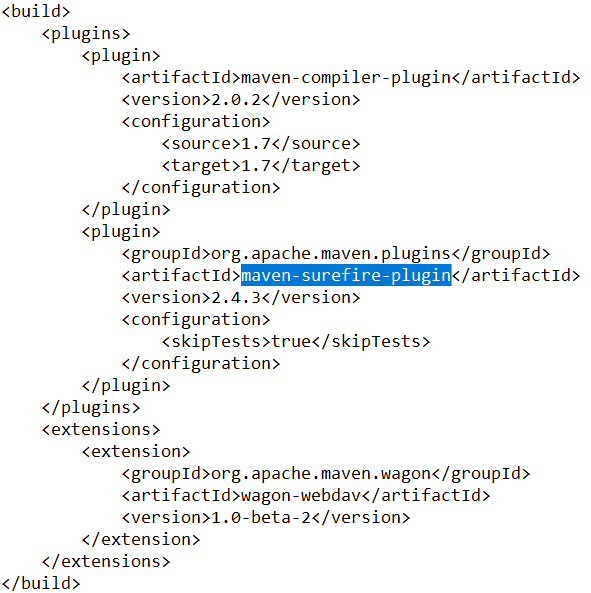
- Repeat for any other build section that has failed
- If the maven-surefire-plugin skipTests has been set to true and still fails
- Set maven-war-plugin <version>x.x.x</version> to the version of maven-compiler-plugin's
7. Fixing Plugin Version
Failed to execute goal "org.apache.maven.plugins:maven-compiler-plugin" 
To fix this issue, please follow the step below:
In the terminal write:
$ mvn wrapper:wrapper
This will automatically download and use the appropriate version of Maven defined in the project's wrapper configuration.