Install the Java Development Kit (JDK)
Download the Java Development Kit (JDK) 11 from https://www.oracle.com/java/technologies/downloads/#java11 or https://adoptium.net/en-GB/temurin/releases/?version=11
OR
Download the Java Development Kit (JDK) 17 from https://www.oracle.com/java/technologies/downloads/#java17 or https://adoptium.net/en-GB/temurin/releases/?version=17
-
Follow the installation instructions at https://docs.oracle.com/javase/8/docs/technotes/guides/install/windows_jdk_install.html
Set JAVA_HOME:
For Windows 8, go to Control Panel > System > Advanced System Settings.
For Windows 10, go to Control Panel > System and Security > System > Advanced System Settings.
Click the Environment Variables button.
Under System Variables, click New.
In the Variable Name field, enter JAVA_HOME
In the Variable Value field, enter the JDK installation path, e.g: C:\Program Files\Java\jdk-11.x.xx.x
Install MySQL.
Download MySQL Server 5.5 or above from http://dev.mysql.com/downloads/mysql/
Follow the installation instructions at http://dev.mysql.com/doc/en/windows-installation.html
Install Apache Maven
Download Apache Maven 2.2.1 or above from https://maven.apache.org/download.cgi
Follow the installation instructions at https://maven.apache.org/install.html
Please ensure that the "mvn" command can be executed from the command line by adding it to the PATH:
In Windows 8 go to Control Panel > System > Advanced System Settings.
For Windows 10, go to Control Panel > System and Security > System > Advanced System Settings.
Click the Environment Variables button.
Under System Variables, select the variable "Path" and click Edit.
In the Variable Value field, append the Maven path (e.g. C:\Program Files\apache-maven-3.3.9\bin) to the current path
Install Git
Download and install the Git client from https://git-scm.com/download/win
2. Install 3rd Party Libraries
Download the 3rd party libraries ZIP from https://dev.joget.org/community/download/attachments/19104566/install-libraries.zip
Unzip the file
Open a Command Prompt to execute the install_win.bat file
cd install-libraries
install_win.bat
Depending on your version of Apache Maven, you might get an error "BUILD FAILED" containing the message: Cannot run program "mvn.cmd"
In this case, edit the file install-libraries\lib\setup-maven_win.xml and replace all occurrences of "mvn.cmd" with "mvn.bat"
3. Obtain Source Code
Open a Git CMD (Git Bash) window and execute the following:
mkdir joget_src
cd joget_src
git clone https://github.com/jogetworkflow/jw-community.git --branch 8.0-SNAPSHOT --depth 1
4. Configure Datasource for Test Case
Joget contains unit test cases that requires access to a running MySQL database.
Open a Command Prompt, and create a MySQL database with the SQL file in joget_src/jw-community/wflow-install/src/main/resources/data/jwdb-empty.sql
mysql -uroot -p
create database jwdb;
exit
mysql -uroot -p jwdb < joget_src/jw-community/wflow-install/src/main/resources/data/jwdb-empty.sql
Download the sample configuration files wflow.zip and unzip it in your user home folder e.g. C:\Users\yourusername\
Edit the wflow\app_datasource-default.properties file e.g. C:\Users\yourusername\wflow\app_datasource-default.properties and ensure that the configuration (e.g. MySQL username and password) is correct
workflowDriver=com.mysql.jdbc.Driver
workflowUrl=jdbc\:mysql\://localhost\:3306/jwdb?characterEncoding\=UTF-8
workflowUser=root
profileName=
workflowPassword=root
To pass unit tests which require a valid datasource, it is important to ensure that:
the wflow folder is located in the correct path inside your user home folder, e.g: C:\Users\yourusername\wflow
the MySQL configuration settings in wflow\app_datasource-default.properties are correct
5. Build Project
In a Command Prompt, browse to the jw-community\wflow-app folder and execute the Maven install command
cd joget_src\jw-community\wflow-app\
mvn clean install
6. Skipping Build Test
Sometimes building the project will fail, if one wish to skip the build test, one can follow the instructions below.
- If for example wflow-commons build has failed, head to the cloned directory of joget_src performed during 3. Obtain Source Code
- Then, browse to jw-community\wflow-commons
- Edit the pom.xml file by opening with a notepad or other similar app that one wish to use
- Press Ctrl + F then type maven-surefire-plugin then press enter
- Set <skipTests>false</skipTests> to <skipTests>true</skipTests>
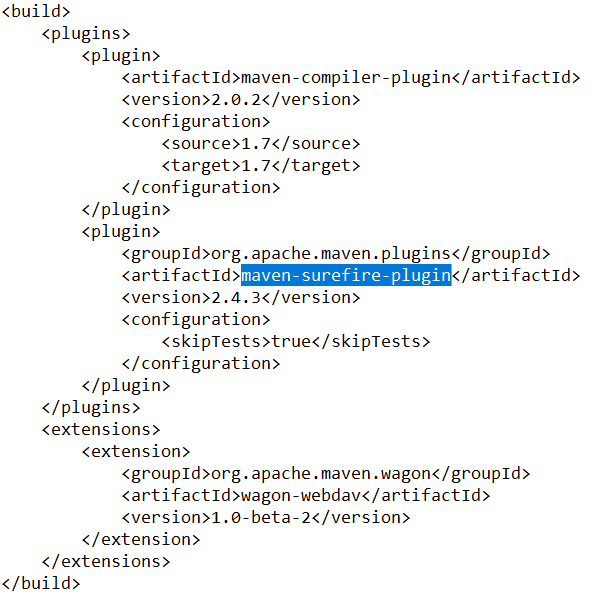
If maven-surefire-plugin is not found, copy and paste from other pom.xml or copy paste the code below under plugin section of the pom
<plugin>

<groupId>org.apache.maven.plugins</groupId>

<artifactId>maven-surefire-plugin</artifactId>

<version>2.4.3</version>

<configuration>

<skipTests>true</skipTests>

</configuration>

</plugin>
- If one is still unsure where to paste, paste under other </plugin>lines as shown in the figure below.
- Repeat for any other build section that has failed
- If the maven-surefire-plugin skipTests has been set to true and still fails
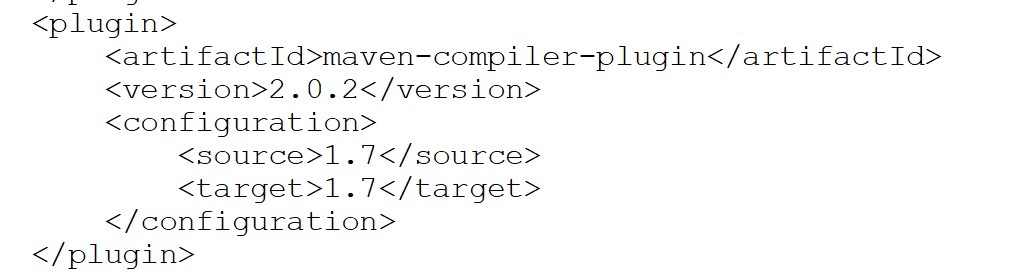
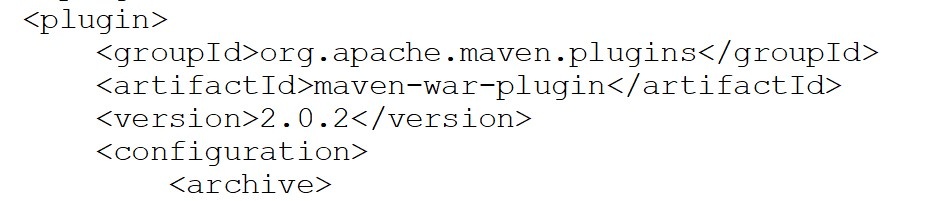
- Set maven-war-plugin <version>x.x.x</version> to the version of maven-compiler-plugin's
7. Fixing Plugin Version
Failed to execute goal "org.apache.maven.plugins:maven-war-plugin:2.3:war" - To fix this issue, please follow the steps below:

- Open "joget_src\jw-community\wflow-consoleweb\pom.xml"
- Make sure maven-war-plugin version is according to maven-compiler-plugin