1. What is the problem?
Sometime, we may need to write some custom query to populate the options for our multi options field.2. How to solve the problem?
Joget Workflow has provided a plugin type called Form Options Binder Plugin. We will develop one to support JDBC connection and custom query.3. What is the input needed for your plugin?
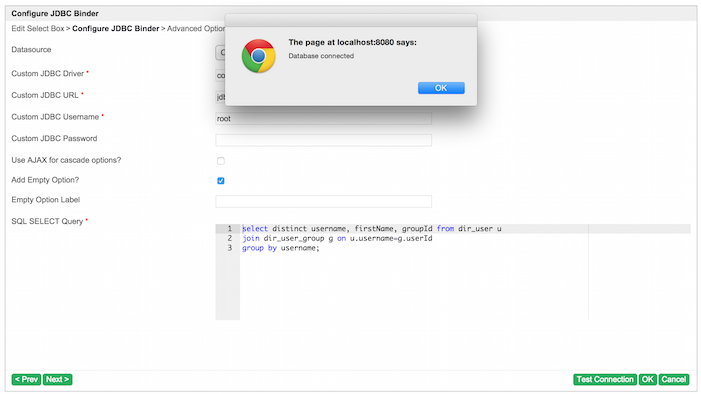
To develop a JDBC Options binder, we will need the JDBC connection setting and also the custom query to populate the options.Datasource: Using custom datasource or Joget default datasource
Custom JDBC Driver: The JDBC driver for custom datasource
Custom JDBC URL: The JDBC connection URL for custom datasource
Custom JDBC Username: The username for custom datasource
Custom JDBC Password: The password for custom datasource
SQL Query: The query to populate options.
Use Ajax: A checkbox to decide whether or not it is using AJAX to load options. (For AJAX Cascading Drop-Down List)
The query should also support a syntax to inject dependency values when using AJAX.
Example:SELECT id, name from app_fd_sample where group = ?
SELECT id, name from app_fd_sample where group in (?)
4. What is the output and expected outcome of your plugin?
The first column of returned JDBC result will be the value of the option and second column is the label of the option. There will be another optional third column for grouping when not using AJAX for cascading drop-down list.5. Are there any resources/API that can be reused?
We can refer to the implementation of other available Form Options Binder plugins. Joget default datasource can be retrieve with AppUtil.getApplicationContext().getBean("setupDataSource").6. Prepare your development environment
We need to always have our Joget Workflow Source Code ready and built by following this guideline.The following tutorial is prepared with a Macbook Pro and Joget Source Code version 8.0-Snapshot. Please refer to the Guideline for developing a plugin article for other platform commands.
Let's say our folder directory is as follows.
- Home
  - joget
    - plugins
    - jw-community
The "plugins" directory is the folder we will create and store all our plugins and the "jw-community" directory is where the Joget Workflow Source code is stored.
Run the following command to create a maven project in "plugins" directory.
cd joget/plugins/
~/joget/jw-community/wflow-plugin-archetype/create-plugin.sh org.joget.tutorial jdbc_options_binder 8.0-Snapshot
Then, the shell script will ask us to key in a version number for the plugin and request for a confirmation before generating the maven project.
Define value for property 'version':  1.0-SNAPSHOT: : 8.0-Snapshot
[INFO] Using property: package = org.joget.tutorial
Confirm properties configuration:
groupId: org.joget.tutorial
artifactId: jdbc_options_binder
version: 5.0.0
package: org.joget.tutorial
Y: : y
We should get "BUILD SUCCESS" message shown in our terminal and a "jdbc_options_binder" folder created in "plugins" folder.
Open the maven project with your favour IDE. I will be using NetBeans.
7. Just code it!
a. Extending the abstract class of a plugin type
Create a "JdbcOptionsBinder" class under "org.joget.tutorial" package. Then, extend the class with org.joget.apps.form.model.FormBinder abstract class.To make it work as a Form Options Binder, we will need to implement org.joget.apps.form.model.FormLoadOptionsBinder interface. We would like to support AJAX Cascading Drop-Down List as well, so we need to implement org.joget.apps.form.model.FormAjaxOptionsBinder interface also.
Please refer to Form Options Binder Plugin.
b. Implement all the abstract methods
As usual, we have to implement all the abstract methods. We will be using AppPluginUtil.getMessage method to support i18n and using constant variable MESSAGE_PATH for message resource bundle directory.Then, we have to create a UI for admin user to provide inputs for our plugin. In getPropertyOptions method, we have already specify that our Plugin Properties Options definition file is located at "/properties/jdbcOptionsBinder.json". Let us create a directory "resources/properties" under "jdbc_options_binder/src/main" directory. After creating the directory, create a file named "jdbcOptionsBinder.json" in the "properties" folder.
In the properties definition options file, we will need to provide options as below. Please note that we will use "@@message.key@@" syntax to support i18n in our properties options.
[{
    title : '@@form.jdbcOptionsBinder.config@@',
    properties : [{
        name : 'jdbcDatasource',
        label : '@@form.jdbcOptionsBinder.datasource@@',
        type : 'selectbox',
        options : [{
            value : 'custom',
            label : '@@form.jdbcOptionsBinder.customDatasource@@'
        },{
            value : 'default',
            label : '@@form.jdbcOptionsBinder.defaultDatasource@@'
        }],
        value : 'default'
    },{
        name : 'jdbcDriver',
        label : '@@form.jdbcOptionsBinder.driver@@',
        description : '@@form.jdbcOptionsBinder.driver.desc@@',
        type : 'textfield',
        value : 'com.mysql.jdbc.Driver',
        control_field: 'jdbcDatasource',
        control_value: 'custom',
        control_use_regex: 'false',
        required : 'true'
    },{
        name : 'jdbcUrl',
        label : '@@form.jdbcOptionsBinder.url@@',
        type : 'textfield',
        value : 'jdbc:mysql://localhost/jwdb?characterEncoding=UTF8',
        control_field: 'jdbcDatasource',
        control_value: 'custom',
        control_use_regex: 'false',
        required : 'true'
    },{
        name : 'jdbcUser',
        label : '@@form.jdbcOptionsBinder.username@@',
        type : 'textfield',
        control_field: 'jdbcDatasource',
        control_value: 'custom',
        control_use_regex: 'false',
        value : 'root',
        required : 'true'
    },{
        name : 'jdbcPassword',
        label : '@@form.jdbcOptionsBinder.password@@',
        type : 'password',
        control_field: 'jdbcDatasource',
        control_value: 'custom',
        control_use_regex: 'false',
        value : ''
    },{
        name : 'useAjax',
        label : '@@form.jdbcOptionsBinder.useAjax@@',
        type : 'checkbox',
        options : [{
            value : 'true',
            label : ''
        }]
    },{
        name : 'addEmpty',
        label : '@@form.jdbcOptionsBinder.addEmpty@@',
        type : 'checkbox',
        options : [{
            value : 'true',
            label : ''
        }]
    },{
        name : 'emptyLabel',
        label : '@@form.jdbcOptionsBinder.emptyLabel@@',
        type : 'textfield',
        control_field: 'addEmpty',
        control_value: 'true',
        control_use_regex: 'false',
        value : ''
    },{
        name : 'sql',
        label : '@@form.jdbcOptionsBinder.sql@@',
        description : '@@form.jdbcOptionsBinder.sql.desc@@',
        type : 'codeeditor',
        mode : 'sql',
        required : 'true'
    }],
    buttons : [{
        name : 'testConnection',
        label : '@@form.jdbcOptionsBinder.testConnection@@',
        ajax_url : '[CONTEXT_PATH]/web/json/app[APP_PATH]/plugin/org.joget.tutorial.JdbcOptionsBinder/service?action=testConnection',
        fields : ['jdbcDriver', 'jdbcUrl', 'jdbcUser', 'jdbcPassword'],
        control_field: 'jdbcDatasource',
        control_value: 'custom',
        control_use_regex: 'false'
    }]
}]
In the Properties Options, we added a button for testing connection when using a custom datasource. This button will call a JSON API to do the test. So, our plugin will need to implement org.joget.plugin.base.PluginWebSupport interface to make it as a Web Service Plugin as well. Let's implement the webService method as follows, to test the JDBC connection.
    /**
     * JSON API for test connection button
     * @param request
     * @param response
     * @throws ServletException
     * @throws IOException
     */
    public void webService(HttpServletRequest request, HttpServletResponse response) throws ServletException, IOException {
        //Limit the API for admin usage only
        boolean isAdmin = WorkflowUtil.isCurrentUserInRole(WorkflowUserManager.ROLE_ADMIN);
        if (!isAdmin) {
            response.sendError(HttpServletResponse.SC_UNAUTHORIZED);
            return;
        }

        String action = request.getParameter("action");
        if ("testConnection".equals(action)) {
            String message = "";
            Connection conn = null;
            try {
                AppDefinition appDef = AppUtil.getCurrentAppDefinition();

                String jdbcDriver = AppUtil.processHashVariable(request.getParameter("jdbcDriver"), null, null, null, appDef);
                String jdbcUrl = AppUtil.processHashVariable(request.getParameter("jdbcUrl"), null, null, null, appDef);
                String jdbcUser = AppUtil.processHashVariable(request.getParameter("jdbcUser"), null, null, null, appDef);
                String jdbcPassword = AppUtil.processHashVariable(SecurityUtil.decrypt(request.getParameter("jdbcPassword")), null, null, null, appDef);

                Properties dsProps = new Properties();
                dsProps.put("driverClassName", jdbcDriver);
                dsProps.put("url", jdbcUrl);
                dsProps.put("username", jdbcUser);
                dsProps.put("password", jdbcPassword);
                DataSource ds = BasicDataSourceFactory.createDataSource(dsProps);

                conn = ds.getConnection();

                message = AppPluginUtil.getMessage("form.jdbcOptionsBinder.connectionOk", getClassName(), MESSAGE_PATH);
            } catch (Exception e) {
                LogUtil.error(getClassName(), e, "Test Connection error");
                message = AppPluginUtil.getMessage("form.jdbcOptionsBinder.connectionFail", getClassName(), MESSAGE_PATH) + "\n"  + e.getMessage();
            } finally {
                try {
                    if (conn != null && !conn.isClosed()) {
                        conn.close();
                    }
                } catch (Exception e) {
                    LogUtil.error(DynamicDataSourceManager.class.getName(), e, "");
                }
            }
            try {
                JSONObject jsonObject = new JSONObject();
                jsonObject.accumulate("message", message);
                jsonObject.write(response.getWriter());
            } catch (Exception e) {
                //ignore
            }
        } else {
            response.setStatus(HttpServletResponse.SC_NO_CONTENT);
        }
    }
Once we are done with the properties option to collect input and the web service to test the connection, we can work on the main method of the plugin which is the loadAjaxOptions method.
    public FormRowSet loadAjaxOptions(String[] dependencyValues) {
        FormRowSet rows = new FormRowSet();
        rows.setMultiRow(true);

        //add empty option based on setting
        if ("true".equals(getPropertyString("addEmpty"))) {
            FormRow empty = new FormRow();
            empty.setProperty(FormUtil.PROPERTY_LABEL, getPropertyString("emptyLabel"));
            empty.setProperty(FormUtil.PROPERTY_VALUE, "");
            rows.add(empty);
        }

        //Check the sql. If require dependency value and dependency value is not exist, return empty result.
        String sql = getPropertyString("sql");
        if ((dependencyValues == null || dependencyValues.length == 0) && sql.contains("?")) {
            return rows;
        }

        Connection con = null;
        PreparedStatement pstmt = null;
        ResultSet rs = null;

        try {
            DataSource ds = createDataSource();
            con = ds.getConnection();

            //support for multiple dependency values
            if (sql.contains("?") && dependencyValues != null && dependencyValues.length > 1) {
                String mark = "?";
                for (int i = 1; i < dependencyValues.length; i++) {
                    mark += ", ?";
                }
                sql = sql.replace("?", mark);
            }

            pstmt = con.prepareStatement(sql);

            //set query parameters
            if (sql.contains("?") && dependencyValues != null && dependencyValues.length > 0) {
                for (int i = 0; i < dependencyValues.length; i++) {
                    pstmt.setObject(i + 1, dependencyValues[i]);
                }
            }

            rs = pstmt.executeQuery();
            ResultSetMetaData rsmd = rs.getMetaData();
            int columnsNumber = rsmd.getColumnCount();

            // Set retrieved result to Form Row Set
            while (rs.next()) {
                FormRow row = new FormRow();

                String value = rs.getString(1);
                String label = rs.getString(2);

                row.setProperty(FormUtil.PROPERTY_VALUE, (value != null)?value:"");
                row.setProperty(FormUtil.PROPERTY_LABEL, (label != null)?label:"");

                if (columnsNumber > 2) {
                    String grouping = rs.getString(3);
                    row.setProperty(FormUtil.PROPERTY_GROUPING, grouping);
                }

                rows.add(row);
            }
        } catch (Exception e) {
            LogUtil.error(getClassName(), e, "");
        } finally {
            try {
                if (rs != null) {
                    rs.close();
                }
                if (pstmt != null) {
                    pstmt.close();
                }
                if (con != null) {
                    con.close();
                }
            } catch (Exception e) {
                LogUtil.error(getClassName(), e, "");
            }
        }

        return rows;
    }

    /**
     * To creates data source based on setting
     * @return
     * @throws Exception
     */
    protected DataSource createDataSource() throws Exception {
        DataSource ds = null;
        String datasource = getPropertyString("jdbcDatasource");
        if ("default".equals(datasource)) {
            // use current datasource
             ds = (DataSource)AppUtil.getApplicationContext().getBean("setupDataSource");
        } else {
            // use custom datasource
            Properties dsProps = new Properties();
            dsProps.put("driverClassName", getPropertyString("jdbcDriver"));
            dsProps.put("url", getPropertyString("jdbcUrl"));
            dsProps.put("username", getPropertyString("jdbcUser"));
            dsProps.put("password", getPropertyString("jdbcPassword"));
            ds = BasicDataSourceFactory.createDataSource(dsProps);
        }
        return ds;
    }
c. Manage the dependency libraries of your plugin
Our plugin is using dbcp, javax.servlet.http.HttpServletRequest and javax.servlet.http.HttpServletResponse class, so we will need to add jsp-api and commons-dbcp library to our POM file.<!-- Change plugin specific dependencies here -->
<dependency>
<groupId>javax.servlet</groupId>
<artifactId>jsp-api</artifactId>
<version>2.0</version>
</dependency>
<dependency>
<groupId>commons-dbcp</groupId>
<artifactId>commons-dbcp</artifactId>
<version>1.3</version>
</dependency>
<!-- End change plugin specific dependencies here -->
d. Make your plugin internationalization (i18n) ready
We are using i18n message key in getLabel and getDescription method. We also used i18n message key in our properties options definition as well. So, we will need to create a message resource bundle properties file for our plugin.Create directory "resources/messages" under "jdbc_options_binder/src/main" directory. Then, create a "JdbcOptionsBinder.properties" file in the folder. In the properties file, let us add all the message keys and labels as below.org.joget.tutorial.JdbcOptionsBinder.pluginLabel=JDBC Binder org.joget.tutorial.JdbcOptionsBinder.pluginDesc=Used to load field's options using JDBC form.jdbcOptionsBinder.config=Configure JDBC Binder form.jdbcOptionsBinder.datasource=Datasource form.jdbcOptionsBinder.customDatasource=Custom Datasource form.jdbcOptionsBinder.defaultDatasource=Default Datasource form.jdbcOptionsBinder.driver=Custom JDBC Driver form.jdbcOptionsBinder.driver.desc=Eg. com.mysql.jdbc.Driver (MySQL), oracle.jdbc.driver.OracleDriver (Oracle), com.microsoft.sqlserver.jdbc.SQLServerDriver (Microsoft SQL Server) form.jdbcOptionsBinder.url=Custom JDBC URL form.jdbcOptionsBinder.username=Custom JDBC Username form.jdbcOptionsBinder.password=Custom JDBC Password form.jdbcOptionsBinder.useAjax=Use AJAX for cascade options? form.jdbcOptionsBinder.addEmpty=Add Empty Option? form.jdbcOptionsBinder.emptyLabel=Empty Option Label form.jdbcOptionsBinder.sql=SQL SELECT Query form.jdbcOptionsBinder.sql.desc=Use question mark (?) in your query to represent dependency values when using AJAX form.jdbcOptionsBinder.testConnection=Test Connection form.jdbcOptionsBinder.connectionOk=Database connected form.jdbcOptionsBinder.connectionFail=Not able to establish connection.
e. Register your plugin to the Felix Framework
We will have to register our plugin class in Activator class (Auto generated in the same class package) to tell the Felix Framework that this is a plugin. public void start(BundleContext context) {
registrationList = new ArrayList<ServiceRegistration>();
//Register plugin here
registrationList.add(context.registerService(JdbcOptionsBinder.class.getName(), new JdbcOptionsBinder(), null));
}
f. Build it and test
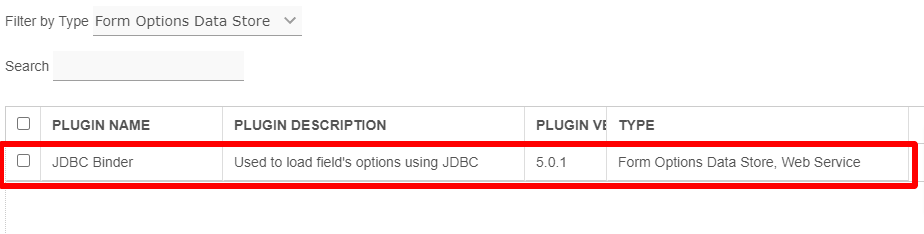
Let build our plugin. Once the building process is done, we will find that a "jdbc_options_binder-5.0.0.jar" file is created under "jdbc_options_binder/target" directory.Then, let us upload the plugin jar to Manage Plugins. After uploading the jar file, double check that the plugin is uploaded and activated correctly.
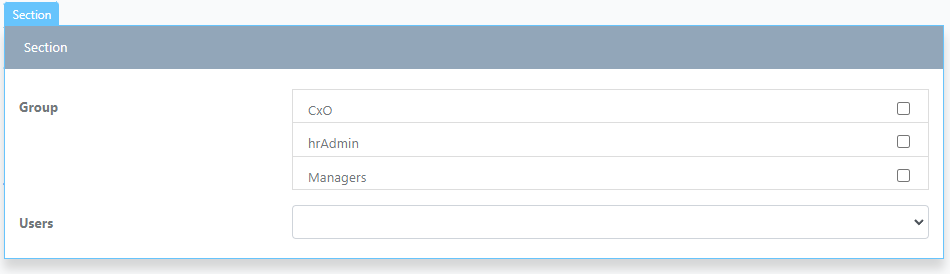
Then, let us create an AJAX Cascading Drop-Down List in a form to test it. Let's create our test form as follows.
Then, configure our select box and JDBC binder.
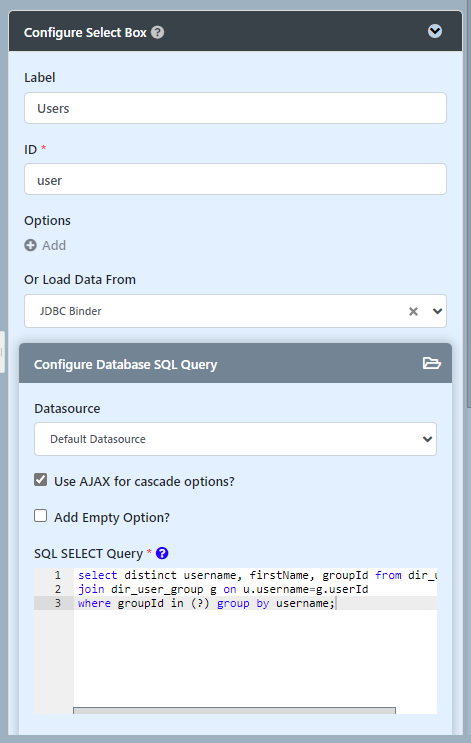
In the query, we will use the following query to get the user list based on group id.
select distinct username, firstName, groupId from dir_user u
join dir_user_group g on u.username=g.userId
where groupId in (?) group by username;
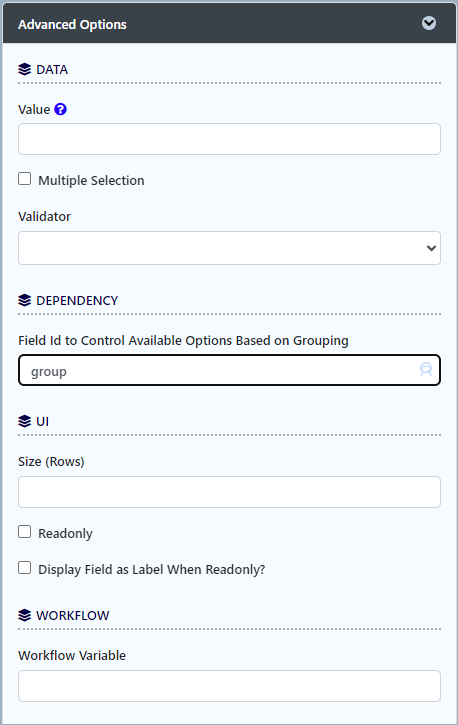
Configure the dependency to "group". Then, test the result.
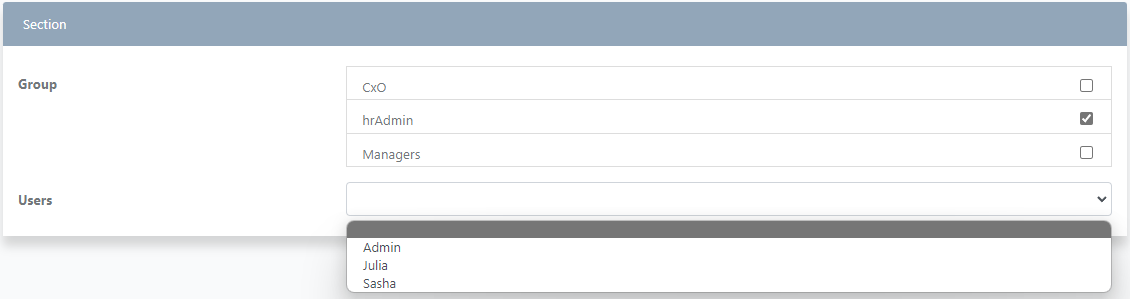
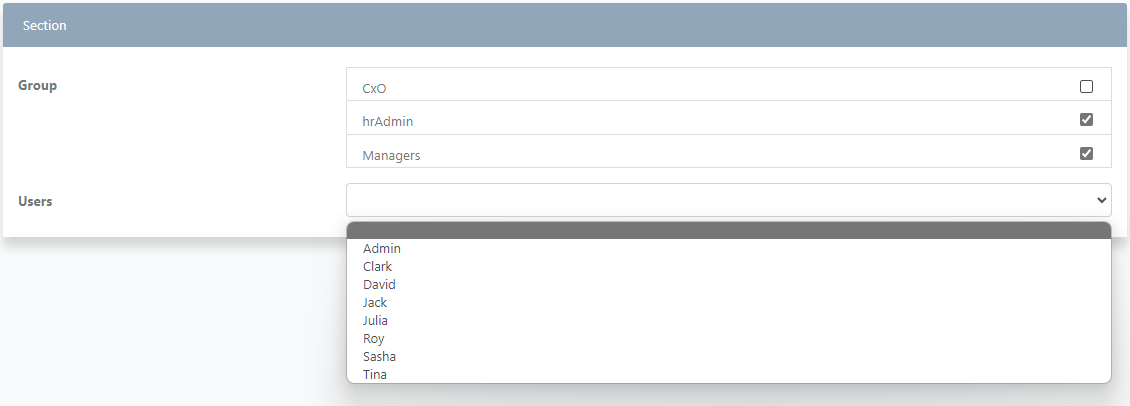
The user select box options changed based on the selected values of group select box.
Now, let's change the query to the following to test the Cascading Drop-Down List without using AJAX.
select distinct username, firstName, groupId from dir_user u
join dir_user_group g on u.username=g.userId
group by username;
Remember to un-tick the "Use AJAX for cascade options?" option to make it not use AJAX.
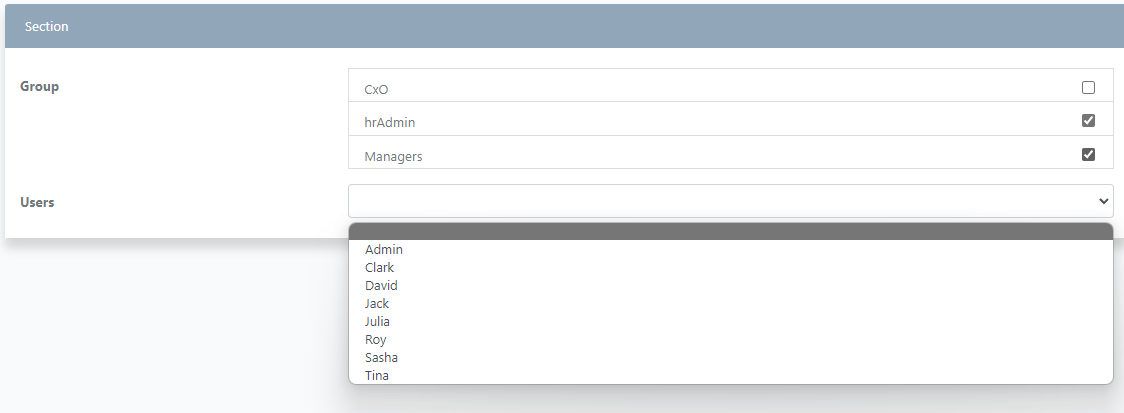
Yes, it works as well. Then, we can test the custom configuration and the test connection button.