Introduction to Kubernetes
A Kubernetes cluster consists of one or more nodes. Nodes are machines (VMs, physical servers, etc) that run the applications.
A Pod is the smallest Kubernetes object that contains one or more containers, storage resources, network IP and other configuration.
A Service defines a set of Pods and how they are accessed.
A Volume is a shared storage for containers, and many different types are supported.
These Kubernetes objects are defined in YAML format in .yaml files
A command line interface tool, kubectl, is used to manage these objects via the Kubernetes API.
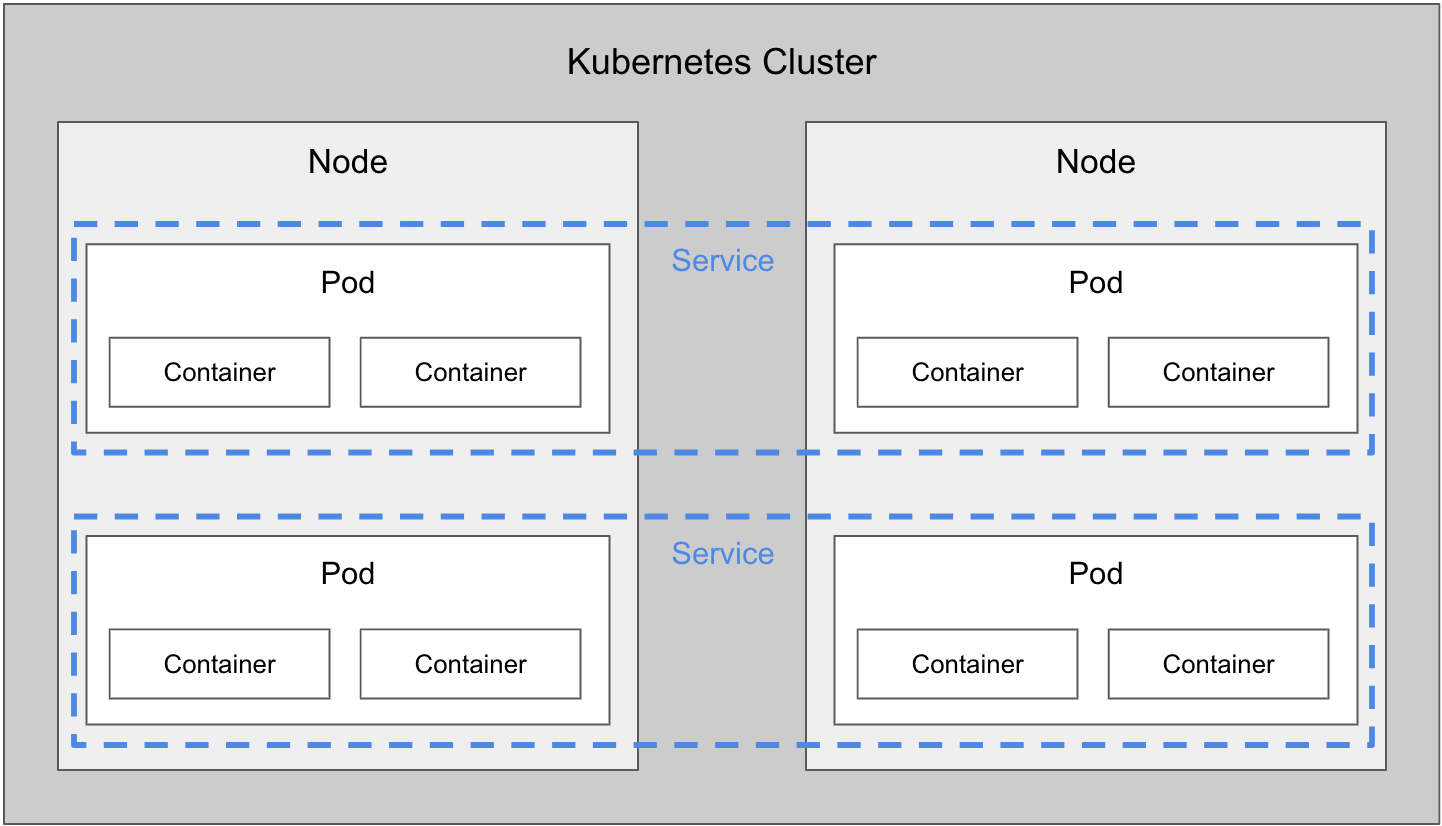
Simplified view of Kubernetes objects
There are many more concepts in Kubernetes, but the basic ones above should suffice to get started with Kubernetes.
There are many Kubernetes solutions available for different requirements from different providers, ranging from community tools for local testing, to production environments from cloud providers and enterprise vendors.
For the purpose of this tutorial we’ll use Minikube, a tool that runs a single-node Kubernetes cluster in a virtual machine for local development and testing. We’ll be using a Mac running macOS, but you can adapt the instructions for your OS.Install VirtualBox
The first step is to install a VM platform. We’ll use the open source VirtualBox as the VM platform. Follow the download and installation instructions at https://www.virtualbox.org/wiki/DownloadsInstall kubectl
The next step is to install the Kubernetes command-line tool, kubectl, which allows you to run commands against Kubernetes clusters e.g. deploy applications, inspect resources, view logs, etc.1. Download and set executable:curl -LO https://storage.googleapis.com/kubernetes-release/release/$(curl -s https://storage.googleapis.com/kubernetes-release/release/stable.txt)/bin/darwin/amd64/kubectl \ && chmod +x ./kubectl
2. Move the binary to your PATH:
sudo mv ./kubectl /usr/local/bin/kubectl
3. Test to ensure the version you installed is up-to-date:
kubectl version
Full instructions are at https://kubernetes.io/docs/tasks/tools/install-kubectl/
Install Minikube
Now let’s install Minikube, a tool that runs a single-node Kubernetes cluster in a virtual machine on your laptop.1. Download and set executable:curl -Lo minikube https://storage.googleapis.com/minikube/releases/latest/minikube-darwin-amd64 \ && chmod +x minikube
2. Move the binary to your PATH:
sudo mv minikube /usr/local/bin
Full instructions are available at https://kubernetes.io/docs/tasks/tools/install-minikube/
Start Minikube
1. Start Minikube and create a cluster:minikube start
The output will be similar to this:
minikube v1.8.1 on Darwin 10.14.6
Automatically selected the hyperkit driver
Downloading VM boot image ...
Creating hyperkit VM (CPUs=2, Memory=3072MB, Disk=20000MB) ...
Preparing Kubernetes v1.17.3 on Docker 19.03.6 ...
Launching Kubernetes ...
Enabling addons: default-storageclass, storage-provisioner
Waiting for cluster to come online ...
Done! kubectl is now configured to use "minikube"
2. Install Ingress on Minikube for external access:
minikube addons enable ingress
Test Minikube Installation
1. Run a sample HTTP applicationkubectl create deployment hello-minikube --image=k8s.gcr.io/echoserver:1.10
2. Expose the service so that external connections can be made
kubectl expose deployment hello-minikube --type=NodePort --port=8080
3. Inspect the pod
kubectl get pod
4. Once the STATUS is Running, test the service using curl
curl $(minikube service hello-minikube --url)
5. Delete the service and deployment
kubectl delete services hello-minikube
kubectl delete deployment hello-minikube
Full instructions are available at https://kubernetes.io/docs/setup/minikube/#quickstart
Deploy MySQL on Kubernetes
To deploy a MySQL database image, we’ll use an example YAML file provided in the kubernetes website k8s.io.1. Create persistent storage using PersistentVolume and PersistentVolumeClaim
kubectl apply -f https://k8s.io/examples/application/mysql/mysql-pv.yaml
2. Deploy the MySQL image
kubectl apply -f https://k8s.io/examples/application/mysql/mysql-deployment.yaml
3. Inspect the deployment
kubectl describe deployment mysql
kubectl get pods -l app=mysql
kubectl describe pvc mysql-pv-claim
4. Run MySQL client to test
kubectl run -it --rm --image=mysql:8 --restart=Never mysql-client -- mysql -h mysql -ppassword
Full instructions are available at https://kubernetes.io/docs/tasks/run-application/run-single-instance-stateful-application/
Deploy Joget on Kubernetes
Once the MySQL database is running, let’s run a Docker image for Joget Enterprise that connects to that MySQL service.1. Deploy joget image using an example YAML file. Download the contents of joget-dx8-tomcat9-deployment.yaml into a file with the same name and run kubectl.
 joget-dx8-tomcat9-deployment.yaml
kubectl apply -f joget-dx8-tomcat9-deployment.yaml
2. Inspect the deployment
kubectl describe deployment joget-dx8-tomcat9
kubectl get pods -l app=joget-dx8-tomcat9
3. Once the STATUS is Running, get the URL for the service
minikube service joget-dx8-tomcat9 --url
4. Access the URL in a browser in the path to access the Joget App Center e.g. http://192.168.99.100:32496/
5. Access the Joget DX URL and in the Database Setup page, key in the database configuration of the database deployed earlier, and click on the Save button.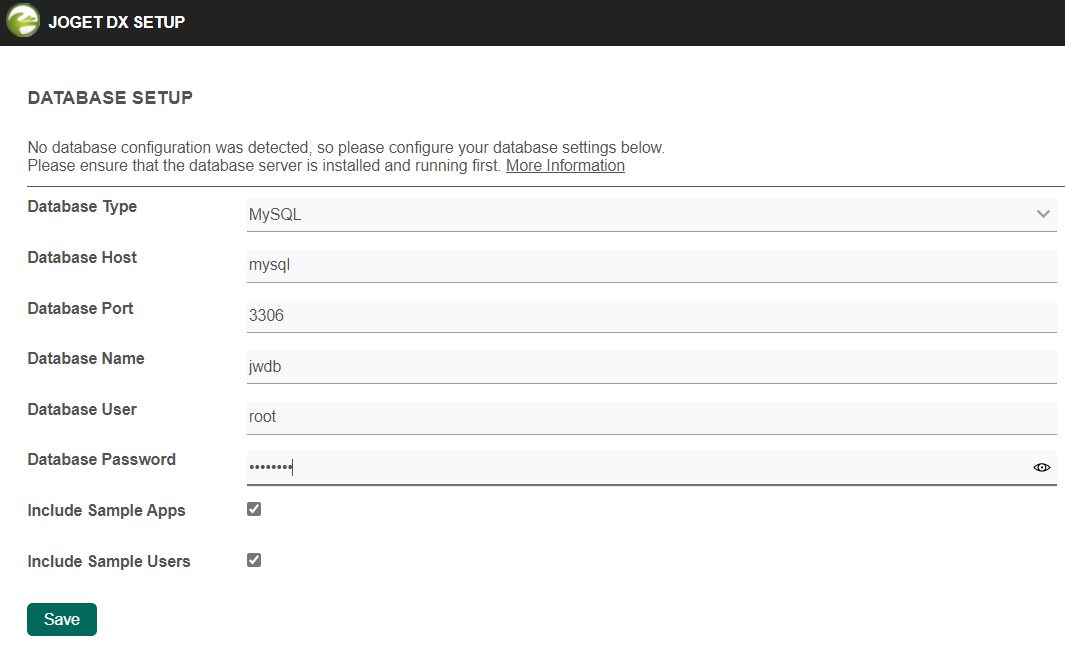
- Database Type: MySQL
- Database Host: the service name of the database e.g. mysql
- Database Port: 3306
- Database Name: jwdb
- Database User: root
- Database Password: the configured password e.g. password
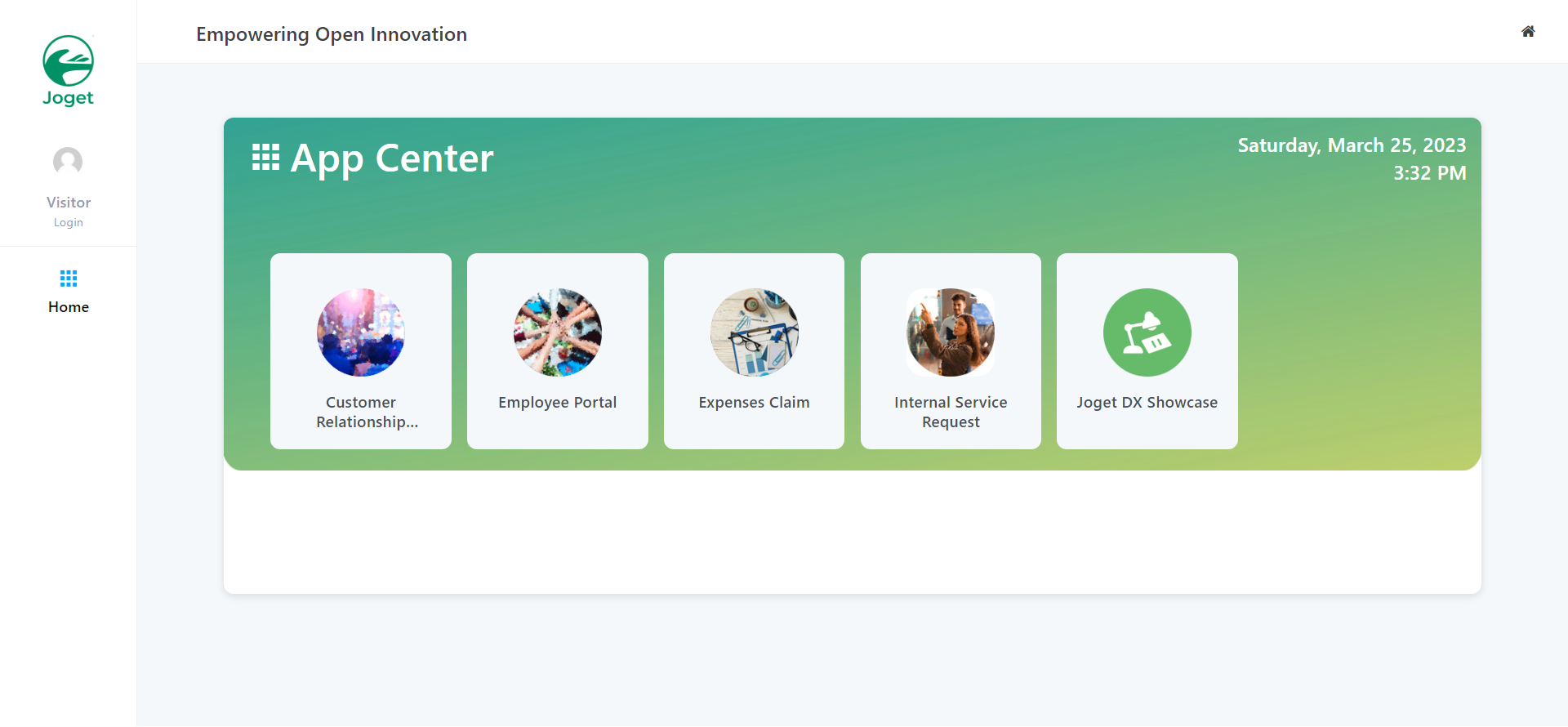
You now have a running installation of Joget, and you’ll be able to visually build a full app in 30 minutes without coding.
Scale Joget Deployment
Now we can demonstrate how Kubernetes can be used to manually increase and decrease the number of Pods running.1. Scale the deployment to 2 pods (called replicas)
kubectl scale --replicas=2 deployment joget-dx8-tomcat9
2. Examine the running pods, and you should see 2 pods running Joget
kubectl get pods
NAME                     READY STATUS RESTARTS   AGE
joget-dx8-tomcat9-7d879db895-c9sbb   1/1 Running 0    27s
joget-dx8-tomcat9-7d879db895-wpnsf   1/1 Running 0    37m
mysql-7b9b7999d8-lk9gq   1/1 Running 0    65m
3. Scale the deployment down to 1 pod
kubectl scale --replicas=1 deployment joget-dx8-tomcat9
4. Examine the running pods, and you should now see 1 pod running Joget.
kubectl get pods
Common Errors
How to Validate Your Installation System Key
- Launch Joget from your browser and login as admin.
- Navigate to Settings > License.
- Your system key should contains dashes as the following.
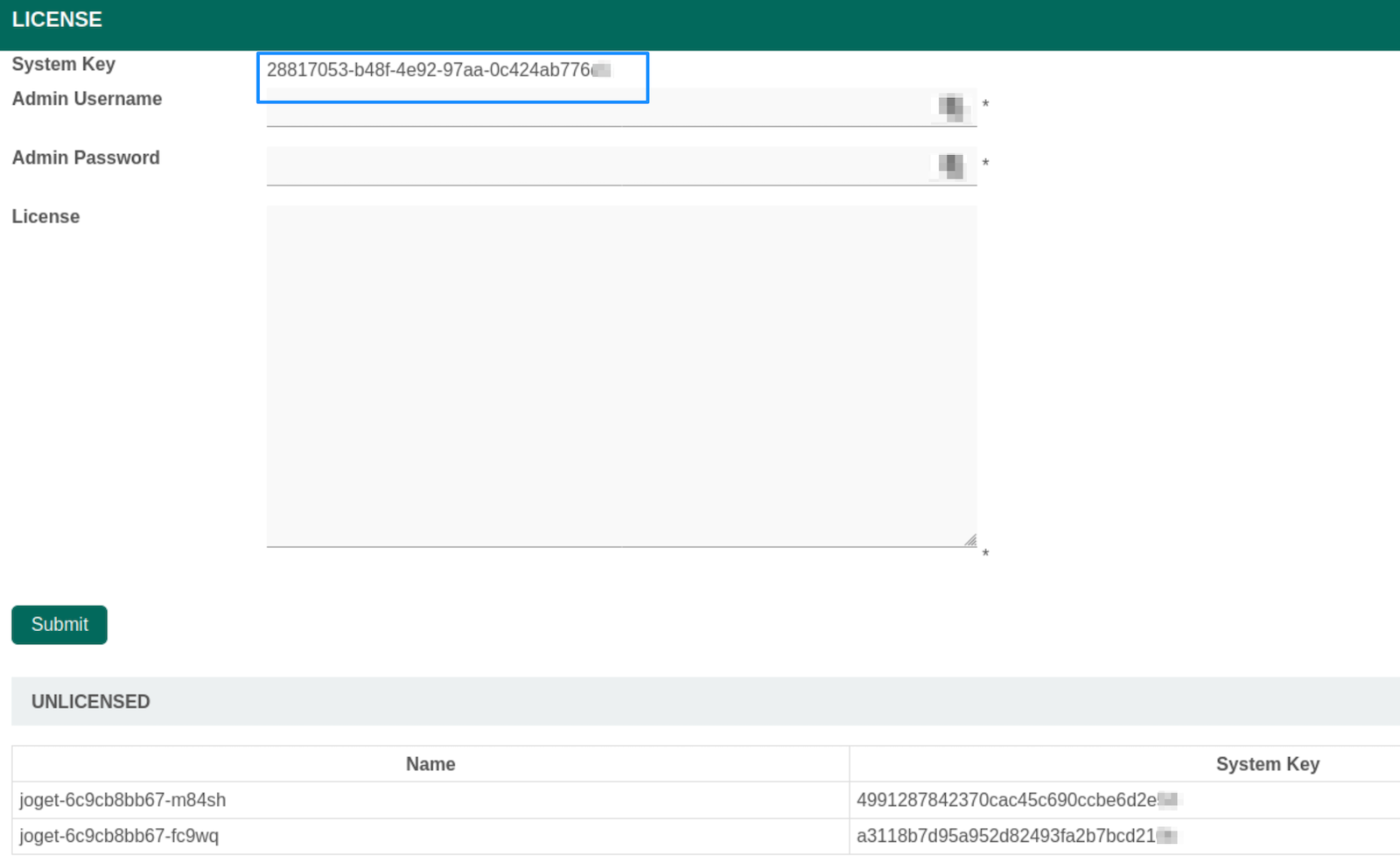
If the system key matches any of the nodes listed at the bottom, then it is wrong. - If it does not, chances are that you did not assign the service account cluster view permission for Joget to retrieve the deployment info.
Check the logs to look for "io.kubernetes.client.openapi.ApiException: Forbidden".ERROR 14 Apr 2021 12:35:03 org.joget.apps.license.LicenseManager - Forbidden io.kubernetes.client.openapi.ApiException: Forbidden at io.kubernetes.client.openapi.ApiClient.handleResponse(ApiClient.java:971) at io.kubernetes.client.openapi.ApiClient.execute(ApiClient.java:883) at io.kubernetes.client.openapi.apis.CoreV1Api.readNamespacedPodWithHttpInfo(CoreV1Api.java:45995) at io.kubernetes.client.openapi.apis.CoreV1Api.readNamespacedPod(CoreV1Api.java:45965) at org.joget.apps.license.LicenseManager.generateK8sDeploymentSystemKey(LicenseManager.java:934) at org.joget.apps.license.LicenseManager.generateClusterSystemKey(LicenseManager.java:854) at org.joget.apps.license.LicenseManager.checkClusterLicense(LicenseManager.java:1055) at org.joget.apps.license.LicenseManager$4.run(LicenseManager.java:1029)
The "io.kubernetes.client.openapi.ApiException: Forbidden"exception shows this permission is missing. You may need to change namespace value if they are not using the default namespace. Once that you have resolved this error, then only the system key would change back to using the deployment ID.
- The following in the YAML file.
apiVersion: rbac.authorization.k8s.io/v1
kind: ClusterRoleBinding
metadata:
name: joget-dx8-tomcat9-clusterrolebinding
roleRef:
apiGroup: rbac.authorization.k8s.io
kind: ClusterRole
name: view
subjects:
- kind: ServiceAccount
name: default
namespace: default
is to assign the service account cluster view permission to retrieve Deployment info for the license system key. - If the RBAC settings of the Kubernetes cluster doesn't allow the use of ClusterRole, you can create a Role and RoleBinding to retrieve the Joget deployment info for the license system key. Use the YAML file below;
---
apiVersion: rbac.authorization.k8s.io/v1
kind: Role
metadata:
name: deployment-info-role
namespace: <namespace-here>
rules:
- apiGroups: ["apps"]
resources: ["replicasets"]
verbs: ["get", "list", "watch"]
- apiGroups: [""]
resources: ["pods"]
verbs: ["get", "list", "watch"]
---
apiVersion: rbac.authorization.k8s.io/v1
kind: RoleBinding
metadata:
name: deployment-info-rolebinding
namespace: <namespace-here>
subjects:
- kind: ServiceAccount
name: default
namespace: <namespace-here>
roleRef:
kind: Role
name: deployment-info-role
apiGroup: rbac.authorization.k8s.io