In this article, we will show you how to show a overlay with "loading..." message when user clicks on links or buttons that navigates away from current page. This serves to improve user experience as a confirmation that click has been registered and to prevent duplicate clickings.
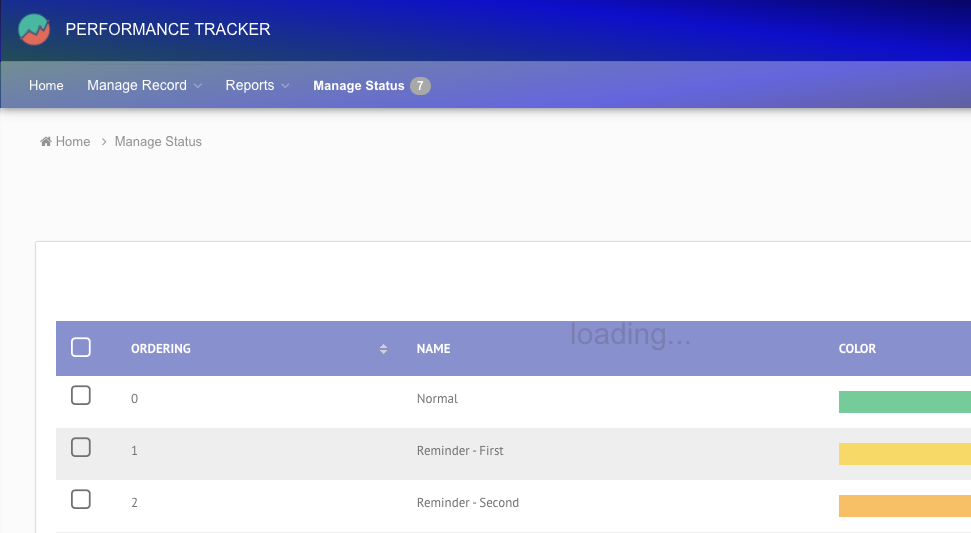
Place this code in Userview Builder > Settings > Custom CSS
#loadingDiv {
    display:none;
    position:fixed;
    width: 100%;
    height: 100%;
    min-height: 100%;
    padding-top: 20%;
    background: #ffffff73;
    opacity: 0.8;
    text-align: center;
    color: #4a3d3d;
    font-size: 30px;

}

#loadingDiv span{
    animation: blinker 2s linear infinite;
}

@keyframes blinker {
  50% {
    opacity: 0;
  }
}
Place this code in Userview Builder > Settings > Custom Javascript
$(function(){

    $('#loadingDiv').click(function(){ $(this).hide()});

	//method1
    $('a, button').not("a.dropdown, button.buttonFontSize").click(function(){
        $('#loadingDiv').fadeIn();
    });
    $("form").on("submit", function(){
        $('#loadingDiv').fadeIn();
    });
});

//method2
//$(window).on('beforeunload', function() {
//    $('#loadingDiv').fadeIn	();
//});
Place this code in Userview Builder > Settings > Sub Header
<div id="loadingDiv"><span>loading...</span></div>