License Error
The license of the app Translations for Confluence (formerly Language Macros) has expired. Please renew the license.
License Error
The license of the app Translations for Confluence (formerly Language Macros) has expired. Please renew the license.
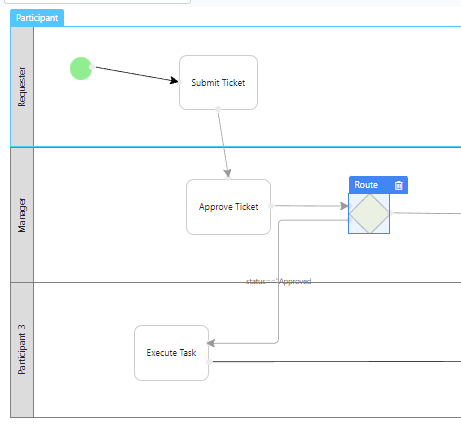
Figure 1: Typical Process Design Flow
License Error
The license of the app Translations for Confluence (formerly Language Macros) has expired. Please renew the license.
Setting Up the User Notification Plugin
License Error
The license of the app Translations for Confluence (formerly Language Macros) has expired. Please renew the license.
Go to App Composer in your app.
License Error
The license of the app Translations for Confluence (formerly Language Macros) has expired. Please renew the license.
Go to Set Plugin Default Properties.
License Error
The license of the app Translations for Confluence (formerly Language Macros) has expired. Please renew the license.
Select User Notification.
License Error
The license of the app Translations for Confluence (formerly Language Macros) has expired. Please renew the license.
In the SMTP Settings tab, configure the email server as required. Sometimes, using gmail might cause problems such as not being able to send email. In that case, if one still insists in using gmail, they may opt to set up an app generated password instead of using the gmail password, or swap to using hotmail instead. The Host for hotmail is smtp-mail.outlook.com , the Port is 587 , the Security is TLS .
License Error
The license of the app Translations for Confluence (formerly Language Macros) has expired. Please renew the license.
In the Configure User Notification tab, customize your email template as needed. It should be a generic email template as it will be used for all activities under your app.
License Error
The license of the app Translations for Confluence (formerly Language Macros) has expired. Please renew the license.
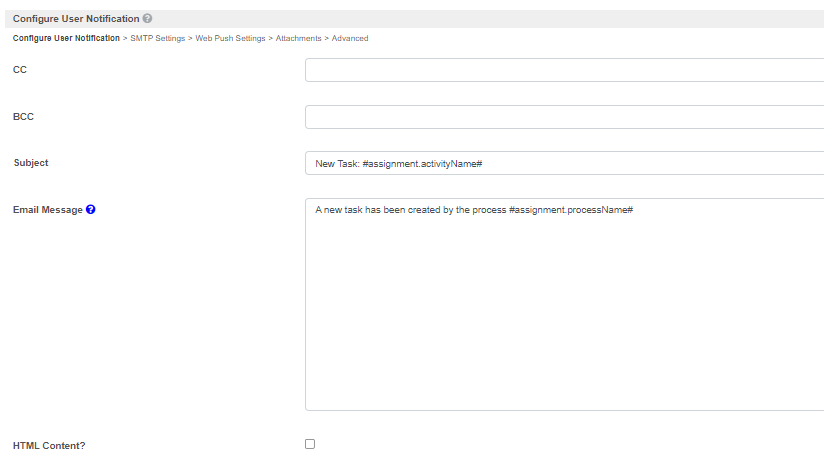
Under the Notification Link section, define the assignment link that will be shown at the end of the email message.
License Error
The license of the app Translations for Confluence (formerly Language Macros) has expired. Please renew the license.
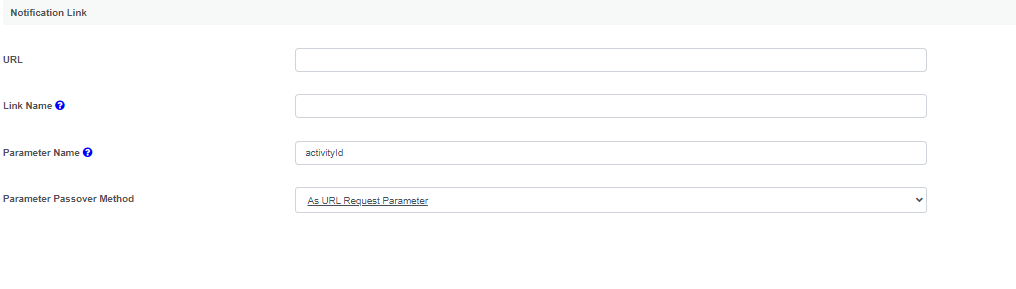
Link to UI Inbox
If you want to link it to your UI Inbox, get the absolute URL to the inbox and key it in the URL field. Type "activityId" in the Parameter Name field and choose "As URL Request Parameter" in the Parameter Passover Method select box.
License Error
The license of the app Translations for Confluence (formerly Language Macros) has expired. Please renew the license.
In the last tab, you may select activities that you would like to exclude from Task Notification.
License Error
The license of the app Translations for Confluence (formerly Language Macros) has expired. Please renew the license.
Note: The User Notification plugin is designed for all activities in an app and not just for a selected few, but only one User Notification plugin can be configured per app. Nevertheless, it is possible for you to manually handle the notification for a specific activity by placing a tool after that activity in your process design, and then excluding it in the Activity Exclusion list in the User Notification plugin.
License Error
The license of the app Translations for Confluence (formerly Language Macros) has expired. Please renew the license.
License Error
The license of the app Translations for Confluence (formerly Language Macros) has expired. Please renew the license.