Hi,
I have a form that some fields are validate with JavaScript. I attach the form: 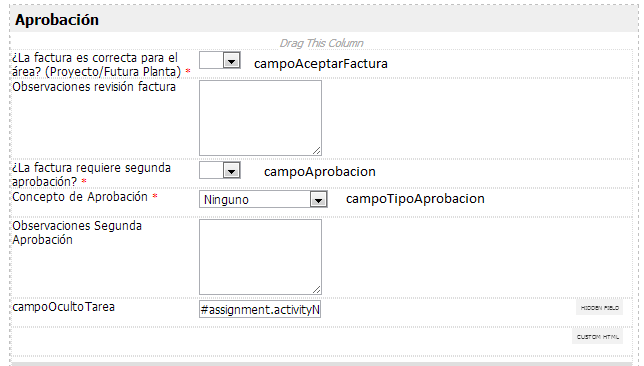
The Javascript that works in V2 is:
<script type="text/javascript">
function formbuilderCustomValidation() {
var containError = false;
var slct1 = document.getElementsByName('campoAprobacion')[0];
var slct2 = document.getElementsByName('campoAceptarFactura')[0];
var slct3 = document.getElementsByName('campoTipoAprobacion')[0];
var txt1 = document.getElementsByName('campoOcultoTarea')[0];
if(txt1.value != 'Radicar Factura VASA'){
if(slct2.value.length == '')
Unknown macro: { containError = true; alert("Seleccione el estado de aprobación de la factura"); }
if(slct2.value == 'si'){
if(slct1.value.length == '')
Unknown macro: { containError = true; alert("Seleccione una opción para aprobación"); }
else{
if(slct1.value == 'si'){
if(slct3.value == '' || slct3.value == '0')
Unknown macro: { containError = true; alert("Seleccione el concepto de aprobación"); }
}
}
}
}
return containError;
}
</script>
When I migrate the code into a CustomHTML, it doesn´t work. I apply some flags to see the behavior but I can´t see the alerts.
Somebody can help me?
Thanks!!!
2 Comments
Yuni Ekasari
<script type="text/javascript">
$("form").submit(function(){
var slct1 =  $('[name=campoAprobacion]').val();
var slct2 =  $('[name=campoAceptarFactura]').val();
var slct3 =  $('[name=campoTipoAprobacion]').val();
var txt1 =  $('[name=campoOcultoTarea]').val();

if(txt1!="Radicar Factura VASA"){
	if (slct2=="") {
		alert("Seleccione el estado de aprobación de la factura");
		return false;
	}
	if (slct2=="si") {
		if (slct1=="") {
			alert("Seleccione una opción para aprobación");
			return false;
		}
		else {
			if (slct1=="si") {
				if (slct3=="" || slct3=="0") {
					alert("Seleccione el concepto de aprobación");
					return false;
				}
			}
		}
	}

}

});
</script>
Hi Victoria, maybe you can try this javascript :
Javascript Victoria.txt
cheers
Victoria Eugenia Patarroyo
Yuni, thanks a lot!!! It's work better.
Regards.