Introduction
The API Connector Form Load plugin allows loading from an API using the GET method.
Get started
API Connector Form Load plugin
- In Form Builder, navigate to the Settings tab.
- For Load Data From, select API Connector from the drop-down list.

Properties configuration
Load Data From (API Connector): Configure API Connector:
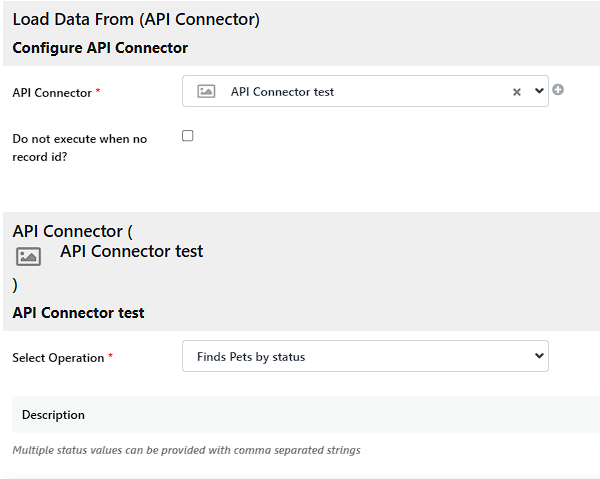
| Name | Description |
|---|---|
| API Connector | Select the API connector created. |
| Do not execute when no record id? | Checking this option displays a blank form when there are no records. |
| Select Operation | Select a GET operation created in the API Connector Builder. |
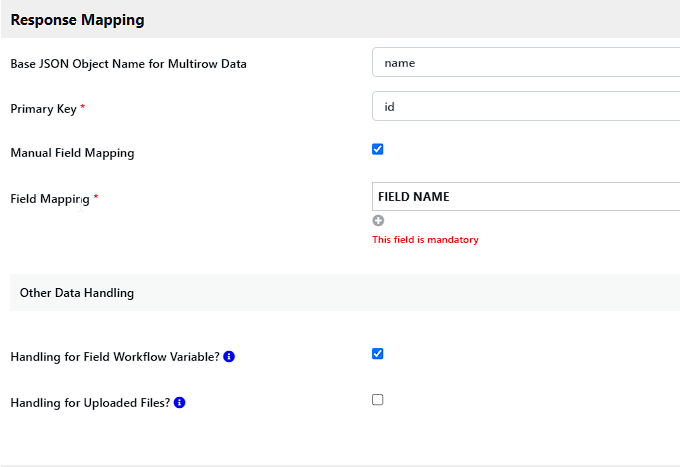
| Name | Description |
|---|---|
| Base JSON Object Name for Multirow Data |
|
| Primary Key | Select a primary key. |
| Manual Field Mapping |
|
| Handling for Field Workflow Variable? | Update workflow variable on form field. Not applicable for grid elements. |
| Handling for Uploaded Files? | Store uploaded files to "app_formuploads" based on form properties table name. |