License Error
The license of the app Translations for Confluence (formerly Language Macros) has expired. Please renew the license.
License Error
The license of the app Translations for Confluence (formerly Language Macros) has expired. Please renew the license.
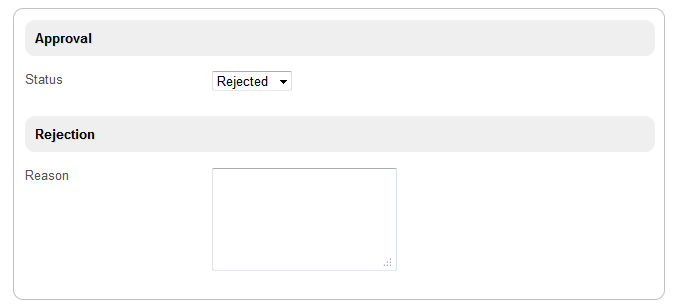
Figure 1: Show/Hide Section Depending on Field Value
Configuration of visibility is done in the target section. Remember to retrieve the information needed from the Select Box properties first.
License Error
The license of the app Translations for Confluence (formerly Language Macros) has expired. Please renew the license.
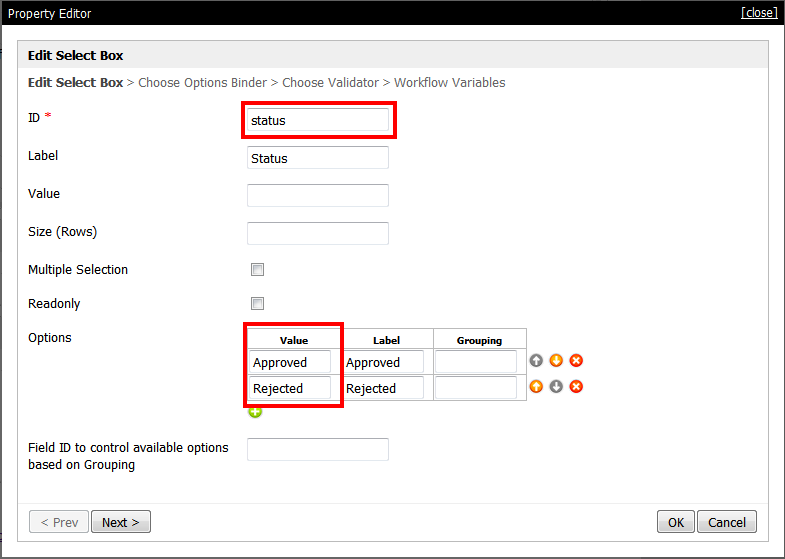
Figure 2: Properties of Select Box "Status"
In Select Box properties, take note of ID and Options. Next, go to the target section's properties, click on the Visibility tab and configure according to desired settings.
An example is shown below.
License Error
The license of the app Translations for Confluence (formerly Language Macros) has expired. Please renew the license.
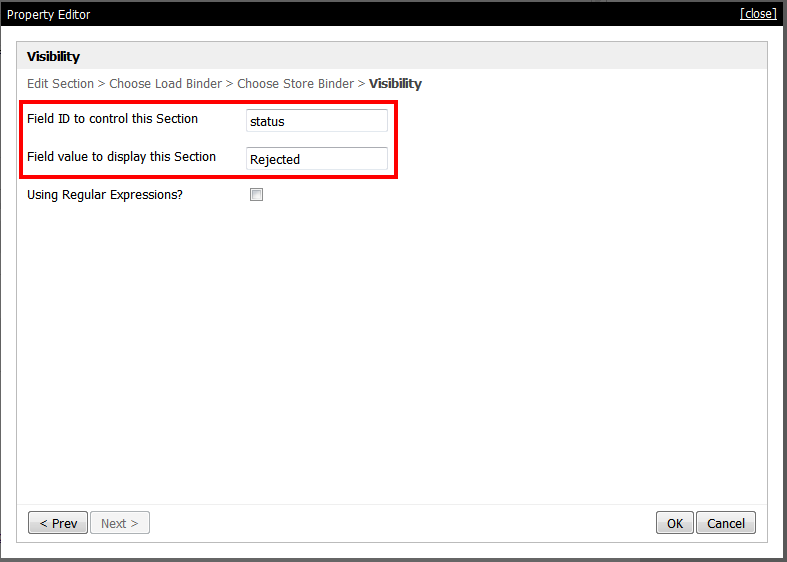
Figure 3: Configuring Visibility in the Section
This particular section will only show when the settings in Visibility match.
License Error
The license of the app Translations for Confluence (formerly Language Macros) has expired. Please renew the license.
License Error
The license of the app Translations for Confluence (formerly Language Macros) has expired. Please renew the license.
 APP_booleanTest-sample.jwa