1
0
-1
3 answers
- 10-1
Hi All,
I have managed to make it work, if there's a place to optimize, please share your suggestions.
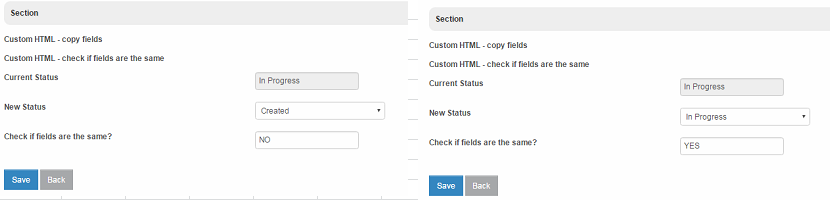
Thanks,
Sylwester
<script type="text/javascript"> $(document).change(function(){ var d1 = "status_new"; var d2 = "status_current"; var fieldId = "check"; //get values var d3 = $('[name='+d1+']:enabled').val(); var d4 = $('[name='+d2+']:enabled').val(); //function to compare diff = "NO"; if (d3 == d4) { diff = "YES"; } //store the value to a field $('[name='+fieldId+']:enabled').val(diff); }); </script>- monday
hi Sylwester Nowak, how can i do this kind of checking if both field reside in different table?
Add your comment... - 10-1
Hi Bastiana, thanks for feedback, I followed your suggestion , but no luck.
Any additional idea?
<script type="text/javascript"> $(document).ready(function(){ $('input[name="status_current"], input[name="status_new"]').change( function(){ var d1 = FormUtil.getField("status_current"); var d2 = FormUtil.getField("status_new"); diff = "NO"; if (d1 == d2) { diff = "YES"; } $('input[name=check]').val(diff); }); }); </script>Add your comment... - 10-1
One is a input tag. One is a select tag.
d1 = $('input[name="status_current"]').val(); d2 = $('input[name="status_new"]').val();Instead of using these code above, use what is posted in Reading Select Box value so that you don't need to worry about the type of tags.
Add your comment...

Hi Masters,
I have a question, I would like to check if two text fields are the same.
If they are the same, then in the field "check" I would like to see "YES". I was trying to write some javascript but without success. Can you have a look into this one please?
APP_TEST_COPY-1-20160427174736.jwa
<script>
$(document).ready(function(){
    $('input[name="status_current"], input[name="status_new"]').change( function(){
          d1 = $('input[name="status_current"]').val();
          d2 = $('input[name="status_new"]').val();
          diff = "NO";
          if (d1 == d2) {
                diff = "YES";
          }
          $('input[name=check]').val(diff);
    });
});
</script>